


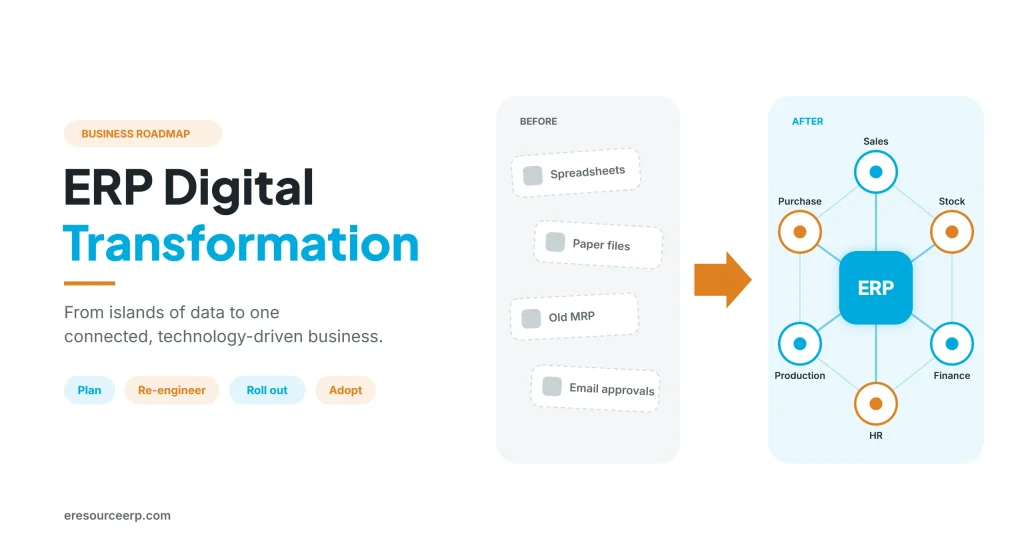
ERP digital transformation means using one connected ERP system to move a business from paper, spreadsheets and separate tools to live, shared data and automated processes. Above all, every organisation today needs to be technology-driven to compete. Yet many firms still run old MRP software or standalone tools that form islands of data. As a result, information stops at department walls. So this guide explains what ERP digital transformation means, the signs you need it, a step-by-step roadmap and how to bring every employee along.
Key takeaways
- One system, one truth: ERP joins sales, purchase, stock, production, HR and finance on shared data, so numbers match.
- Plan before you build: above all, pre-planning and process re-engineering decide success.
- Phase the change: start with core processes, then add modules and locations.
- People matter most: training and simple screens mean every employee comes on board.
What is ERP digital transformation?
Broadly, digital transformation is the use of technology to change how a business works. Similarly, in an ERP digital transformation, the ERP becomes the backbone of that change. In other words, every team works on one platform, while data flows from one step to the next without re-typing.
However, it is more than new software. It also means better processes, clear roles and live reports for decisions. For the basics, read how an ERP system works.
Signs your business needs a change
Often, the need shows up in daily work long before anyone calls it a project. So watch for these signs of an overdue ERP digital transformation:
- Islands of data: each department keeps its own files, so numbers rarely match.
- Re-typing: staff enter the same order or invoice in two or three places, so errors creep in.
- Late reports: month-end figures arrive weeks late, so managers decide on old numbers.
- Old MRP limits: planning tools cannot handle new plants, products or branches.
- Hidden systems: many employees do not know what the system can do, so they avoid it.
- No remote access: managers cannot check stock, sales or approvals when they travel.
From islands of data to one system
Overall, the table below shows what typically changes in an ERP digital transformation:
| Area | Separate tools or old MRP | With one ERP |
|---|---|---|
| Data | Copies in many files | One shared, live database |
| Reports | Built by hand each month | Live dashboards for every team |
| Approvals | Emails and phone calls | Automatic workflows with alerts |
| Stock | Checked by calling the store | Visible on screen in real time |
| Customers | History spread across teams | One record for sales, service and accounts |
| Access | Office computers only | Browser and mobile, anywhere |
For example, approvals alone can save hours each week. Also, to see how, read about ERP workflow management and better data visibility.
A roadmap for ERP digital transformation
A clear plan keeps cost and risk in check. Therefore, follow these steps in order:
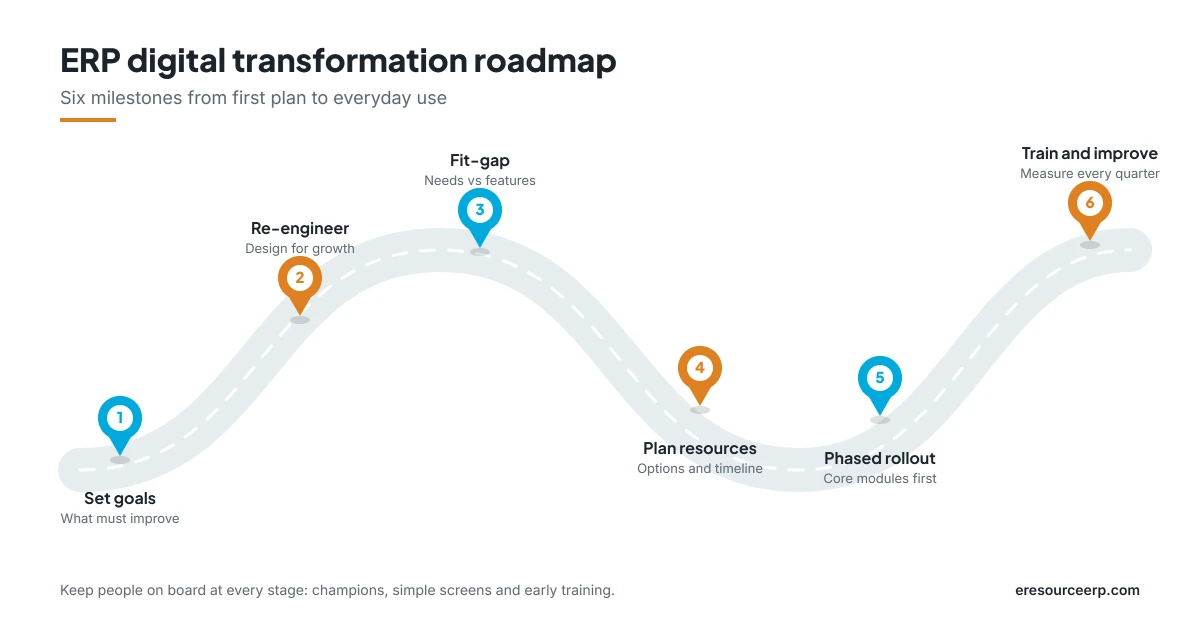
- Set clear goals: first, decide what must improve, such as delivery time, stock levels or month-end speed.
- Re-engineer processes: next, redesign key processes with future growth in mind, not just today’s volume.
- Run a fit-gap analysis: then compare core needs with the ERP’s features, and note every gap.
- Plan resources and schedule: after that, document options, estimates and timelines for each gap.
- Roll out in phases: also, go live with core modules first, then add more teams and sites.
- Train, measure and improve: finally, track your goals and refine processes every quarter.
In addition, for more detail, read about an ERP fit-gap analysis, an ERP implementation strategy and how to make ERP software implementation successful.
Bring every employee along
Previously, ERP was often a tool for a few people in accounts or IT. As a result, many employees did not even know it existed. Today, however, web-based ERP puts the system in front of everyone. So these steps help people use it well during an ERP digital transformation:
- Pick champions: choose one key user in each team to guide others.
- Show what matters: give each role a simple dashboard, so it sees only the data it needs.
- Train early: run short, hands-on sessions before go-live, then follow up after.
- Go mobile: let managers and field staff work from their phones too.
- Share quick wins: celebrate faster approvals or cleaner stock, so others join in.
To learn more, read why ERP is a user-driven ERP implementation, how ERP change management works and the importance of ERP training.
Benefits of ERP digital transformation
When the plan works, the gains reach every part of the business:
- Faster decisions: live data appears instead of late, manual reports.
- Lower costs: less re-typing and fewer errors, as well as better stock control.
- Better service: customers get accurate dates, quotes and answers.
- Easier growth: new plants, branches and users join the same system.
- Stronger control: approvals, audit trails and user rights protect the business.
In short, ERP digital transformation turns technology into a daily advantage. Moreover, a cloud setup speeds up the whole journey, so read about the real cloud ERP benefits.
ERP digital transformation with eresource
eresource is a web-based, AI-powered and no-code ERP with 37 integrated modules on one platform. It has also served businesses for 20 years, with 3,000+ go-lives. So here is how it supports the change:
- Industry editions: ready flows for manufacturing, process, construction, trading, logistics and rental businesses.
- One database: every module shares the same live data, so islands of data disappear.
- Built-in planning: a modern ERP MRP replaces old standalone planning tools.
- No-code changes: adjust fields, screens and workflows as processes evolve.
- Web and mobile access: every employee can reach the system from anywhere.
- Expert guidance: consultants help with process re-engineering, data migration and training.
To learn more, browse all eresource ERP products.
Frequently asked questions
What is the first step in ERP digital transformation?
Start with clear goals. Then map and improve your key processes before you configure any software.
How long does the change take?
Of course, it depends on scope. Usually, a phased rollout delivers core modules in weeks, while the full journey continues over months.
Do we need to change our processes?
Often, yes. A good re-engineering step removes waste, so the ERP supports a better way of working.
How do we get staff to use the new system?
Choose champions, keep screens simple and train early. Also, share quick wins so others see the benefit.
Is cloud ERP better for digital transformation?
For most growing firms, yes. After all, cloud ERP avoids servers, goes live faster and gives access from anywhere.
Which industries does eresource serve?
For example, manufacturing, process, construction, trading, logistics and rental businesses, each with ready industry flows.
Ready to start your ERP digital transformation? Book a free demo, or begin with a free ERP assessment.
Also Read – ERP Implementation Is a User-Driven Project



