


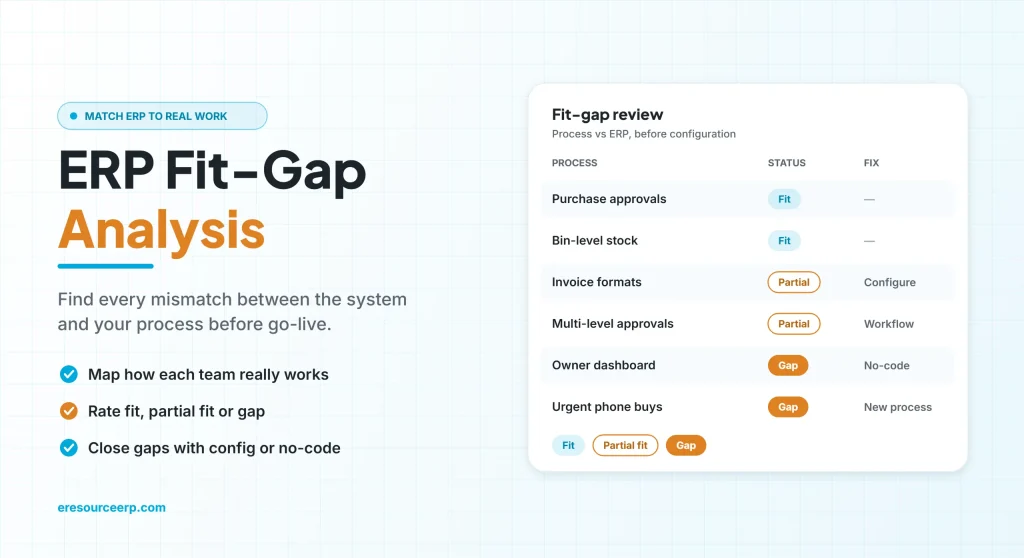
An ERP fit-gap analysis compares how a system works out of the box with how your business really runs, so you can fix every mismatch before go-live instead of after. At heart, every ERP follows industry best practices. However, each company also has its own real-world way of working. When the two do not match, users struggle, errors creep in and people go back to spreadsheets. As a result, people may call the project a failure, even when the software is sound. So this guide explains how an ERP fit-gap analysis works, how to close each gap and how to keep users on board.
Key takeaways
- Misfits cause most ERP pain: the system and daily work must match.
- Map before you build: list every process and rate how well the ERP fits it.
- Four ways to close a gap: configure, change the process, extend, or accept a workaround.
- Two-way learning matters: consultants learn your business, and users learn the system.
What is ERP fit-gap analysis?
An ERP fit-gap analysis is a structured review of your business processes against the features of an ERP system. Then, for each process, the team marks it as a full fit, a partial fit or a gap. After that, it agrees how to handle every gap.
Of course, the idea comes from general gap analysis, which compares where you are with where you want to be. In ERP projects, however, the focus is practical: will this screen, rule or report support the way your people work?
Why misfits make ERP projects fail
When the system cannot meet users’ needs, compatibility suffers and the quality of use drops. Typically, the signs look like this:
- User frustration: people feel the system slows them down instead of helping.
- More errors: users enter data in odd places, just so they can get past a screen.
- Workarounds: side spreadsheets appear again for tasks the ERP should handle.
- Lost productivity: simple jobs take longer than before.
- Missed benefits: as a result, the gains promised in the business case never show up.
In the end, the business then decides the ERP has failed. Yet in most cases the real cause was a gap that an ERP fit-gap analysis would have caught.
Best practices vs real-world practices
First, best practices are proven ways to run a process. In contrast, real-world practices are how your team actually does it today. Still, neither is always right. Overall, the table below shows common findings from an ERP fit-gap analysis and sensible resolutions:
| Process | ERP best practice | Typical real practice | Sensible resolution |
|---|---|---|---|
| Purchase | No PO without an approved requisition | Urgent buys by phone | Adopt the best practice, with a fast-track approval |
| Stock | Bin-level tracking | Store keeper’s memory | Adopt the best practice and label bins |
| Billing | Standard invoice format | Customer-specific formats | Configure print templates in the ERP |
| Approvals | One approval level | Value-based, multi-level approvals | Configure the workflow to match |
| Reports | Standard reports | A unique owner’s dashboard | Build it with no-code tools |
How to run an ERP fit-gap analysis
For example, here is a simple six-step method that works for most small and mid-sized companies:
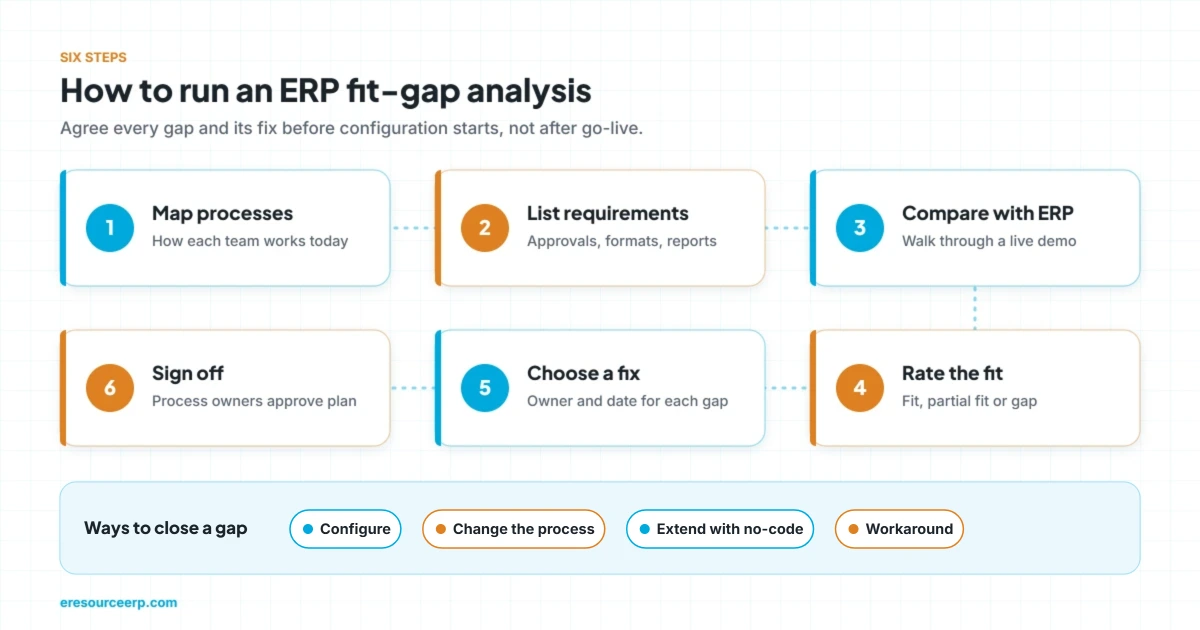
- Map your processes: first, write down how each team works today, from order to cash and from purchase to payment.
- List requirements: next, note what each process must do, such as approvals, formats and reports.
- Compare with the ERP: then walk through each process in a live demo of the system.
- Rate the fit: after that, mark every requirement as a fit, a partial fit or a gap.
- Choose a fix: next, agree how to close each gap, along with an owner and a date.
- Sign off: finally, get process owners to approve the plan before configuration starts.
Four ways to close a gap in ERP fit-gap analysis
Of course, not every gap needs new code. In fact, simpler fixes close most of them.
1. Configure the system
First, check settings, masters and workflows. Often, approval levels, number formats and print layouts already have options, so no new code is needed.
2. Change the process
Second, the best practice is sometimes simply better. In that case, adapt your way of working to the model built into the system.
3. Extend with no-code tools
Next, add fields, screens or dashboards with no-code builders. As a result, you meet unique needs without breaking upgrades.
4. Accept a workaround
Finally, a rare, low-value task may not justify any change. So document a simple workaround and review it later.
Why two-way knowledge transfer matters
An ERP fit-gap analysis only works when knowledge flows both ways. On one side, consultants must learn how your business really runs. On the other hand, users must learn what the system can already do.
Therefore, include key users from every team in the workshops. After all, they know the exceptions that never appear in a process chart. Likewise, good training after go-live keeps the agreed process alive. For more, read about the importance of ERP training and ERP implementation fundamentals.
Why ERP fit-gap analysis matters for SMEs
Today, large and small companies alike face tougher competition. However, SMEs have less room for a failed project. They also need to move fast when demand changes, cut costs and keep customers loyal.
So a careful ERP fit-gap analysis protects both budget and timeline. In addition, it helps small firms choose a system that fits their industry from day one. To see how this plays out, read about ERP adoption in SMEs and how ERP supports small business growth.
How eresource reduces gaps
eresource is a web-based, AI-powered and no-code ERP with 37 integrated modules on one platform. It has also served businesses for 20 years, with 3,000+ go-lives.
- Industry editions: ready processes for manufacturing, process, construction, trading and logistics.
- Built-in best practices: proven flows, so most companies can adopt them as they are.
- No-code changes: add fields, screens, workflows and dashboards yourself instead of waiting for code.
- Flexible approvals: value-based, multi-level workflows, so any document follows your rules.
- Experienced consultants: teams that run a structured ERP fit-gap analysis before setup.
- Unlimited users: one flat license, so every key user can join from the start.
To learn more, read how eresource supports business processes in real time, why global business best practices matter, and how clean master data in ERP sets you up well. You can also explore all eresource ERP products.
Frequently asked questions
What is ERP fit-gap analysis?
It is a review that compares your business processes with an ERP’s features, then rates each one as a fit, a partial fit or a gap.
When should you run an ERP fit-gap analysis?
Ideally, do it before you buy and again before configuration. That way, you find gaps early, so costs stay under control.
Who should take part in an ERP fit-gap analysis?
Typically, process owners, key users from each team, and the ERP consultants. Together, then, they cover both the business and the system.
How are ERP gaps usually closed?
Generally, by configuration or a small process change. In addition, no-code extensions handle unique needs, and rare cases use a workaround.
Should we change our process or the ERP?
It depends. If the built-in best practice is better, change the process. However, if your way gives a real edge, adapt the system.
Does eresource help with fit-gap analysis?
Yes. For example, the free ERP assessment maps your key processes against eresource before you decide.
Want to see how well eresource fits your processes? Start with a free ERP assessment, or book a free demo.
Also Read – Importance of ERP Training for a Successful Rollout



