


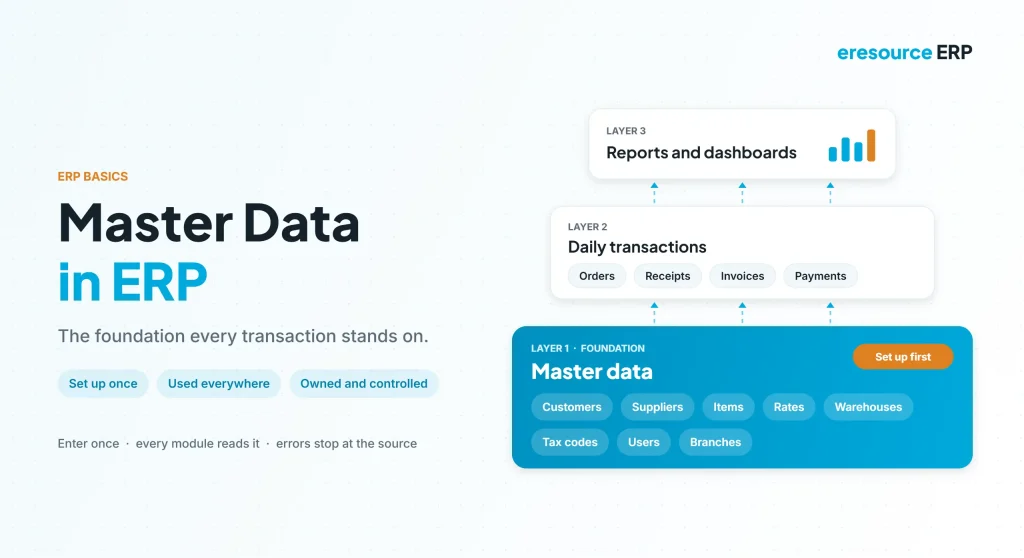
Master data in ERP is the core reference information, such as customers, suppliers, items, warehouses and tax codes, that every transaction draws on. Set it up well once, and every order, invoice and report picks up the right details. Get it wrong, however, and the same error repeats across thousands of entries. That is why the master module is the first thing a company sets up in any ERP. This guide explains what master data in ERP means, its main types, how the eresource master module works, and how to keep it clean.
Key takeaways
- Masters come first: set them up before anyone books an order or invoice.
- One record, many uses: you create a customer or item once, and every module uses it.
- Errors multiply: one wrong rate or tax code affects every transaction that uses it.
- Clean data needs owners: clear rules and user rights keep masters accurate.
What is master data in ERP?
Master data is the stable detail a business uses again and again. For example, a customer’s name, address, credit limit and price list rarely change. In contrast, transaction data, such as an order or an invoice, is created every day and points back to those masters.
The table below shows the difference:
| Point | Master data | Transaction data |
|---|---|---|
| Examples | Customers, suppliers, items, warehouses, tax codes | Orders, receipts, invoices, payments |
| How often it changes | Rarely | Every day |
| Who maintains it | Admin or an authorised owner | Users in each department |
| Effect of one error | Repeats in every linked entry | Usually limited to one entry |
Main types of master data in ERP
Most companies group their masters into a few families. Here are the common ones:
- Party masters: customers, suppliers, agents, job workers, transporters, consultants and other service providers.
- Item masters: finished goods, semi-finished items, raw materials, packing material, consumables, tools and capital goods.
- Pricing masters: customer-wise and supplier-wise item rates, currency conversion rates, and terms and conditions.
- Inventory masters: warehouses, stock levels, item groups and scrap conversion rules.
- Organisation masters: companies, branches, users and the employee hierarchy.
- Production masters: production processes and product categories.
- Finance masters: ledgers, fixed assets and tax codes.
Together, these types of master data in ERP feed every module. So when they are right, the whole system runs smoothly.
How the eresource master module is laid out
In eresource ERP, the master module groups all of this under a few clear heads: Account, Item, General, Warehouse and Report. When you point at a head, its sub-heads appear, so finding the right master takes one click.
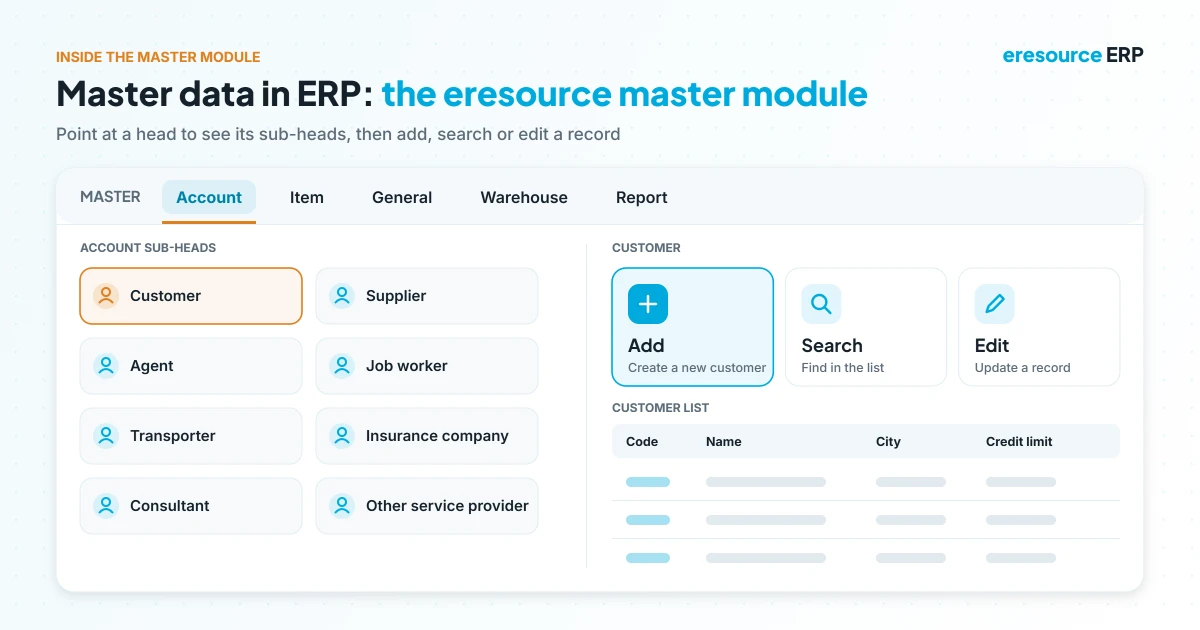
For instance, the Account head holds customers, suppliers, agents, job workers, transporters, insurance companies, consultants and other service providers. Each sub-head then offers three simple actions: Add a new record, Search the list, or Edit an existing one.
Similarly, the Item head holds every type of item, while other masters link records together. For example, branch-item and branch-party relations decide which items and parties each branch can use. Likewise, party evaluation records how each supplier performs.
Why master data comes first
Before anyone works in sales, purchase or stores, the admin or an authorised person sets up the master data in ERP. After that, users simply pick from it.
For example, when a sales user selects a customer, the ERP fills in the price, payment terms, tax and delivery address from the master. As a result, users type less, and every order follows the same rules. To see how one entry then flows across departments, read about integrated ERP modules.
Common master data problems
Most data issues start with weak master data in ERP. Watch for these signs:
- The same customer or item appears twice under slightly different names.
- Item codes and units of measure follow no clear pattern.
- Old prices or tax codes stay active after they change.
- Key fields, such as GSTIN or credit limit, are left blank.
- Too many people can create or edit masters without approval.
Each problem may look small. However, together they lead to wrong invoices, stock mismatches and reports that nobody trusts.
7 best practices for master data in ERP
Good habits keep master data in ERP accurate for years. In short, follow these seven practices.
1. Give each master an owner
First, make one team responsible for each family. For example, purchase owns suppliers, while sales owns customers.
2. Set naming and coding rules
Next, agree on one way to write codes, names and units. Then everyone creates records the same way.
3. Search before you add
Also, always search the list before creating a new record. This simple step prevents most duplicates.
4. Make key fields mandatory
In addition, the system should not save a party or item without its tax number, unit or group.
5. Control who can change masters
Moreover, give create and edit rights only to trained owners. Other users can then view and select records but not change them.
6. Review masters regularly
Meanwhile, check rates, credit limits and inactive records every quarter. Then block or merge anything out of date.
7. Clean data before migration
Finally, never load old spreadsheets as they are. Instead, remove duplicates and fix codes first. For deeper guidance, see this overview of master data management.
How to set up master data in ERP before go-live
- Collect your lists: first, gather customers, suppliers, items and rates from every source.
- Clean and standardise: next, remove duplicates and apply your naming rules.
- Load in order: then create companies and branches, followed by parties, items, rates and relations.
- Test with real entries: after that, book a few sample orders and invoices to check defaults.
- Lock and assign owners: finally, limit edit rights and name an owner for each master.
For a full rollout plan, see how to implement ERP in 90 days.
Why eresource makes master data easier
eresource is a web-based, AI-powered and no-code ERP with 37 integrated modules on one platform. It has also served businesses for 20 years, with 3,000+ go-lives. Here is how it keeps master data in ERP simple:
- One master module: parties, items, rates, warehouses and users sit in one place.
- Simple actions: add, search and edit records from the same screen.
- Smart relations: link items and parties to branches, and set customer-wise or supplier-wise rates.
- User rights: decide who can create, edit or only view each master.
- No-code fields: add the fields your business needs without a developer.
- Multi-company and multi-branch: share masters across entities or keep them separate.
To learn more, explore all eresource ERP products and the key ERP modules every business needs. Contractors can also see the ERP system for construction industry and EPC ERP.
Frequently asked questions
What is master data in ERP?
Master data in ERP is the stable reference data that daily entries use, such as customers, suppliers, items, warehouses, rates and tax codes.
What is the difference between master data and transaction data?
Master data rarely changes and is reused. In contrast, transaction data, such as orders and invoices, is created every day and points to the masters.
Who should maintain ERP master data?
Usually, the system administrator or a named owner in each team. Other users should only view and select records.
Why is master data important in ERP?
Every transaction pulls details from the masters. So accurate masters mean accurate orders, invoices, stock and reports.
How do you avoid duplicate masters?
First, search before adding a record. Then use naming rules, mandatory fields and limited edit rights.
What masters does the eresource master module include?
It covers parties, items, pricing, warehouses, users, branches, production processes and more, under heads such as Account, Item, General, Warehouse and Report.
Want to see the eresource master module in action? Book a free demo, or start with a free ERP assessment.
Also Read – Integrated ERP Modules: How One Entry Updates Every Department



