


Every growing firm faces the same choice when it buys ERP. Should it run the system in the cloud or on its own servers? For most small and mid-sized firms, cloud computing is now the more economical way to run business software. Still, the choice needs careful planning. In this post, we compare cloud ERP vs on-premise ERP on cost, speed, scaling and support. We also explain when each option makes sense.
What Cloud and On-Premise ERP Mean
With on-premises software, you buy servers and licences and run the ERP in your own office. Your IT team then installs, maintains and upgrades everything.
With cloud ERP, the vendor hosts the system for you. Your staff simply log in through a browser and pay a regular subscription. eresource has run on the web from the start, so it suits this model naturally. Learn more about cloud computing and eresource ERP.
Cloud ERP vs On-Premise at a Glance
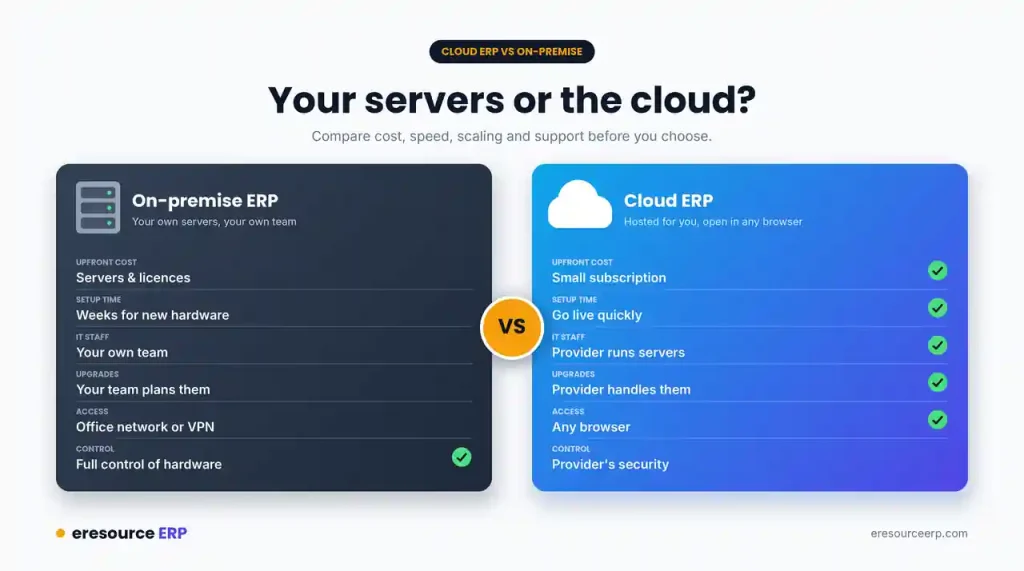
Here is how the two models compare:
- Upfront cost: Cloud needs a small subscription, while on-premise needs servers and licences.
- Setup time: Cloud can go live quickly, whereas new hardware can take weeks to arrive and set up.
- IT staff: The cloud provider runs the servers, but on-premise needs your own team.
- Upgrades: The provider handles cloud updates, while your team plans on-premise upgrades.
- Access: Cloud works from any browser, but on-premise often needs the office network or a VPN.
- Control: On-premise gives you full control of hardware and data location. With cloud, you rely on the provider’s security.
Scaling in Cloud ERP vs On-Premise
Cloud computing can add power on demand. So when operations need more resources, for example during a busy production season, the cloud can supply them quickly.
On-premise works very differently. You must buy a new server, load the software and test everything before use. That process can take weeks or even months.
Lower Capital Costs and Faster ROI
Because cloud ERP goes live sooner, firms can expect a faster return on investment. It also cuts capital spending.
Rather than buying new equipment and software every few years, you pay a steady, predictable amount. In other words, ERP becomes a running cost you can plan for. For more detail, read about ERP implementation cost and ERP software price.
Why SMEs Gain Most From Cloud ERP
Small and medium firms often benefit most from the cloud. While they grow, an in-house IT department and the staff to run it can drain their budget.
With cloud ERP, they can put that money into areas that help them grow instead. See why a web-based ERP for SMEs fits so well. You can also read about hosted ERP for small businesses.
Subscribe to Only What You Need
Every company needs something different. Some only want to update a few modules. Others may want a demand-planning tool or a production planning module for an overseas plant. They do not need a full ERP suite.
Cloud subscriptions make this easy. Learn more about modular ERP and how a multi-plant ERP links sites in different places.
When On-Premise May Still Fit
To be fair, on-premise still suits some firms. For instance, strict rules may require data to stay on your own servers. You may also already run a data centre with a skilled IT team.
In such cases, discuss your hosting options with our team before you decide.
How to Decide on Cloud ERP vs On-Premise
Before you implement any ERP, discuss and evaluate your needs in detail. Then follow these steps:
- Count the full cost: Compare five years of spending, including hardware, staff and upgrades.
- Check your IT capacity: Ask whether your team can run servers around the clock.
- Review data rules: Note any laws on where your data must sit.
- Plan for growth: Think about new sites, users and modules.
- Talk to consultants: Our consultants will answer your questions about ERP and the cloud.
Regular talks between your managers and our team help you understand the system closely. For the basics, read what an ERP system is.
Make the Cloud ERP vs On-Premise Choice With eresource
Explore our cloud ERP software and the real benefits of cloud ERP. You can also read how cloud based ERP helps your business. To find the right model, book a free ERP demo.
Also Read – Transportation ERP Software
FAQs About Cloud ERP vs On-Premise
What is the difference between cloud ERP and on-premise ERP?
With on-premise ERP, you buy servers and licences and run the system in your own office. With cloud ERP, the vendor hosts the system, and your staff log in through a browser for a regular subscription.
Is cloud ERP cheaper than on-premise?
For most small and mid-sized firms, yes. Cloud ERP avoids large spending on servers and IT staff. Instead, you pay a steady, predictable amount over time.
Is cloud ERP secure?
With cloud ERP, you rely on the provider to protect your data. So ask about access controls, backups and where the data sits before you sign. On-premise gives you full control, but your own team must handle security. Read more about ERP security.
When does on-premise ERP make sense?
On-premise may suit you if rules require data to stay on your own servers. It can also suit firms that already run a data centre with a skilled IT team.
Can I subscribe to only some ERP modules in the cloud?
Yes. You can start with the modules you need, such as production planning for one plant, and add more later. Read more about modular ERP.



