


Modular ERP: A Need-Based ERP System That Fits Your Budget
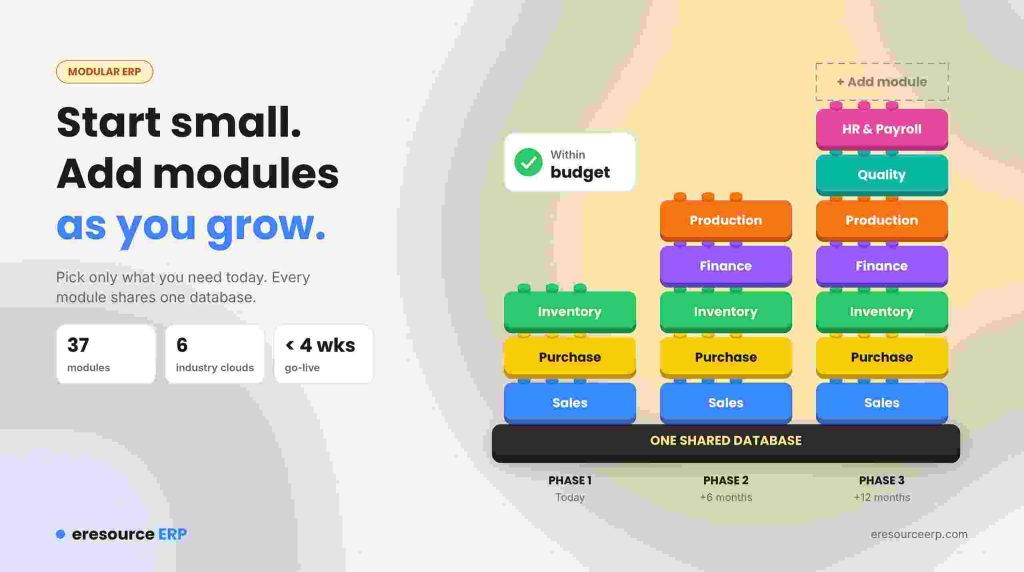
Many business owners think of ERP as a huge, costly, all-or-nothing project. It does not have to be. A modular ERP lets you start with the modules you need today and add more as you grow. As a result, the project stays within budget, and you see value sooner.
In this post, we explain how modular ERP works and why it suits growing firms. We also show how eresource makes ERP need-based and affordable.
What Is a Modular ERP?
An ERP system runs the core work of a business in one place. A modular ERP splits that work into separate parts, such as finance, purchase, stock, sales, production and HR. Each module handles one business function.
You choose only the modules you need. Even so, they all share one database, so data still flows between them. For example, a sale in the sales module updates stock and accounts at once. To learn more, see our guide to key ERP modules.
The Old Problem: All-or-Nothing ERP
In the past, most vendors sold ERP as one big package. Companies had to buy and roll out the full suite, even when they never used many of the modules. So costs went up, projects dragged on and staff struggled to learn the system.
Because of this, many firms saw ERP as a burden rather than a help. In fact, this became one of the main drawbacks of early ERP.
How eresource Makes ERP Need-Based
eresource took a different approach. Instead of forcing a full package, it lets you pick modules for each function. For instance, a trader may start with sales, purchase and stock. Later, a manufacturer may add production, quality and maintenance.
Today, the platform offers 37 modules across six industry clouds. Beyond the core areas, it covers supply chain management, demand forecasting, sales automation and marketing. So you can begin small and grow the system step by step.
Why Modular ERP Fits Small and Mid-Sized Budgets
The internet changed who could afford ERP. With web-based ERP like eresource, small and mid-sized firms (SMEs) finally gained access to its benefits. They no longer needed costly servers or large upfront deals.
At the same time, larger firms that once avoided big ERP spending started to invest again. A modular plan lets them control cost while they test the value. You can also use our cloud ERP on a monthly subscription. Therefore, the return on investment arrives faster for firms of every size.
Fast Implementation Saves Money
Long rollouts used to scare companies away from ERP. A slow project ties up money, distracts staff and costs valuable man-hours. Meanwhile, the business may lose sales.
eresource follows a quick plan with easy-to-learn training sessions. Its 3X faster implementation method aims for go-live in under four weeks. Read more about effective ERP implementation.
Access Anywhere, Anytime
eresource runs on the web, so your business operations move online. Any authorised user can reach the data they need from anywhere, at any time. In addition, the mobile ERP app puts approvals and reports on their phones. This kind of access now ranks among the top ERP trends.
Industries That Use eresource Modules
eresource offers industry editions with ready modules for many sectors. These include:
- Manufacturing, with eresource Xcel
- Construction and contracting
- Government contractors
- Transport and logistics
- Trading and distribution
Each edition comes with screens and workflows for its own industry. Therefore, you spend less time and money on custom work.
How to Plan a Modular ERP Within Budget
A clear plan keeps your ERP spend under control. Follow these steps:
- List your needs: Write down the processes that cause the most delays today.
- Start with the core: Pick the modules that solve those problems first.
- Check the full cost: Add up license or subscription, setup and training.
- Plan the next phase: Decide which modules to add in the next six to twelve months.
- See it live: Ask for a demo with your own data before you buy.
Start With the Modules You Need
eresource has helped growing firms adopt ERP at their own pace since 2006. To find the right starting point, take the free ERP assessment. Or book a free demo to see the modules in action.
Also Read – ERP for Plastic industry
FAQs About Modular ERP
What is a modular ERP?
A modular ERP splits the system into separate modules, such as finance, sales, stock and production. You choose only the ones you need. Even so, all modules share one database.
Is a modular ERP cheaper than a full ERP suite?
Usually, yes, at the start. You pay only for the modules you use, and then you add more as the business grows.
Can we add more modules later?
Yes. eresource lets you start with core modules and add others when you need them. Your existing data stays in the same system.
How long does eresource take to implement?
The 3X faster implementation method aims for go-live in under four weeks. In addition, short training sessions help staff start quickly.
Is modular ERP a good fit for SMEs?
Yes. SMEs can start small, control costs and grow the system with the business. Also, web access keeps hardware costs low.



