


Every manufacturer wants to offer better products and service at a lower price than its rivals. For firms with more than one factory, that goal gets harder. Each plant has its own machines, staff, stock and costs. A multi-plant ERP brings all of them into one system, so you can plan the whole business as one. As a result, you move faster than competitors who still juggle separate tools.
In this post, we explain how ERP balances resources across sites. We also show how live shop-floor data helps you stay ahead.
ERP: A Tool for Balancing Resources
At its heart, ERP is a method for balancing and making the most of a company’s resources. It works on a simple idea: every business is unique, yet most share the same basic processes.
Used well, eresource helps firms reach strong results in growth, profit and product development. It also speeds up your daily operations, so you can serve customers faster than your rivals.
Choose the Right System and Support
ERP is now essential for sound financial planning and daily operations. Many systems are on the market, so choosing the right ERP system is the most important step.
However, software alone will not grow your business. You also need the right training and ongoing support. Together, they help your team use the system fully from day one.
How a Multi-Plant ERP Balances Demand
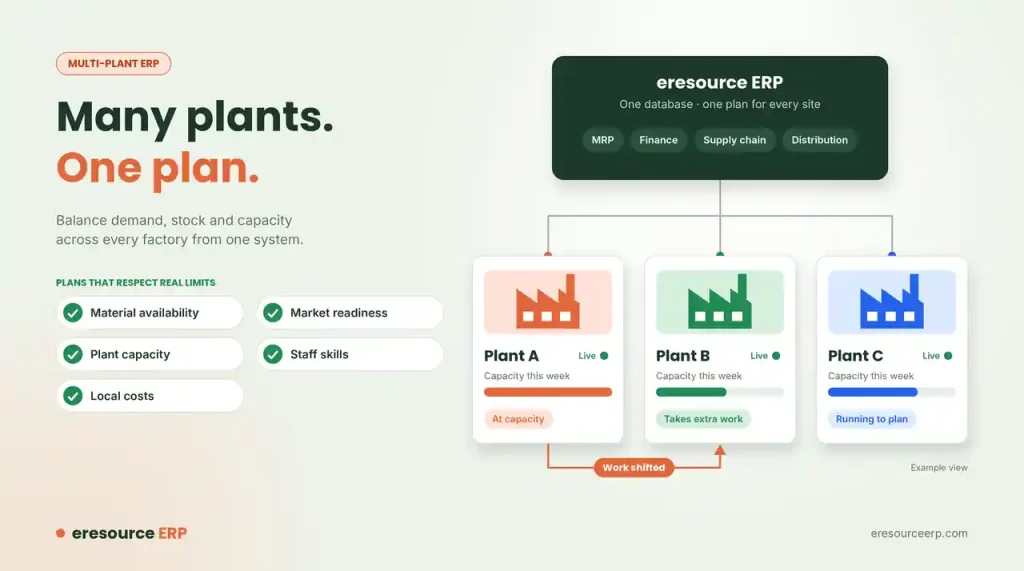
Customer demand rarely stays inside one plant. Orders often depend on many related items made at different sites. eresource helps you balance these demands across all your locations.
For example, if one plant runs short of capacity, the system can shift work to another. Meanwhile, material requirements planning works for every site, not just one. Finance, supply chain and distribution also run across all locations from the same database.
Planning Around Real-World Limits
Plans often fail because they ignore real limits. A multi-plant ERP takes these limits into account as they change:
- Material availability: What stock each site has and what is on order.
- Market readiness: When customers will actually need the product.
- Plant capacity: How much each factory can make in a given week.
- Staff skills: Which workers hold the right training or certification.
- Local costs: What it costs to make the product at each location.
Because eresource weighs all of these together, your plans stay realistic. In turn, you avoid late deliveries and wasted capacity. The production module turns these plans into daily work orders.
Live Data From the Shop Floor
In modern factories, information flows from the top and the bottom at the same time. Machines, processes and workers all create data. Sensors, controls and operators then collect it.
eresource captures this data and turns it into accurate, timely information for decisions. You can also connect machines and devices through IoT and open APIs. So managers see what is happening on every line, at every plant, in real time.
Stay Ahead of Your Competitors
Most companies have years of old habits that slow them down. A multi-plant ERP gives you a chance to break free from them. In other words, you can take a big step forward and become a leader in your industry.
To see how the same data cuts stock, staffing and IT costs, read about operational efficiency with ERP. You can also learn about the wider competitive advantage of ERP.
Benefits of a Multi-Plant ERP
When all your plants run on one system, the gains add up:
- One plan for every site: Demand, stock and capacity line up across plants.
- Better use of capacity: Work moves to the plant that can handle it.
- Lower stock: Sites share stock instead of each holding extra.
- Faster decisions: Live shop-floor data reaches managers at once.
- Clear costs: You can compare the true cost of making each product at each location.
How to Roll Out ERP Across Several Plants
Follow these steps for a smooth start:
- Start with a pilot plant: Go live at one site first, then roll out to the others.
- Standardise item codes: Use the same codes for materials and products at every site.
- Set plant-level rules: Define capacity, shifts and costs for each location.
- Connect machines: Link key equipment so data flows in automatically.
- Review monthly: Compare plans with actual output and adjust.
For more on the pilot approach, read our guide to ERP implementation strategy.
See a Multi-Plant ERP in Action
eresource has helped manufacturers run several plants as one business since 2006. Our 3X faster implementation method aims for go-live in under four weeks. To see it on your own processes, book a free ERP demo.
Also Read – Manufacturing ERP Software
FAQs About Multi-Plant ERP
What is a multi-plant ERP?
A multi-plant ERP runs several factories from one system. So you can plan demand, stock and capacity across all your sites together.
How does ERP balance work between plants?
It looks at capacity, stock and costs at every site. If one plant runs short, the system can shift work to another.
What limits does multi-plant planning consider?
It weighs material availability, market readiness, plant capacity, staff skills and local costs, so plans stay realistic.
Can eresource collect data from machines?
Yes. You can connect machines and devices through IoT and open APIs, so managers see live data from every line.
Should we go live at all plants at once?
Usually not. Start with one pilot plant, then roll out to the other sites using what you learned.



