


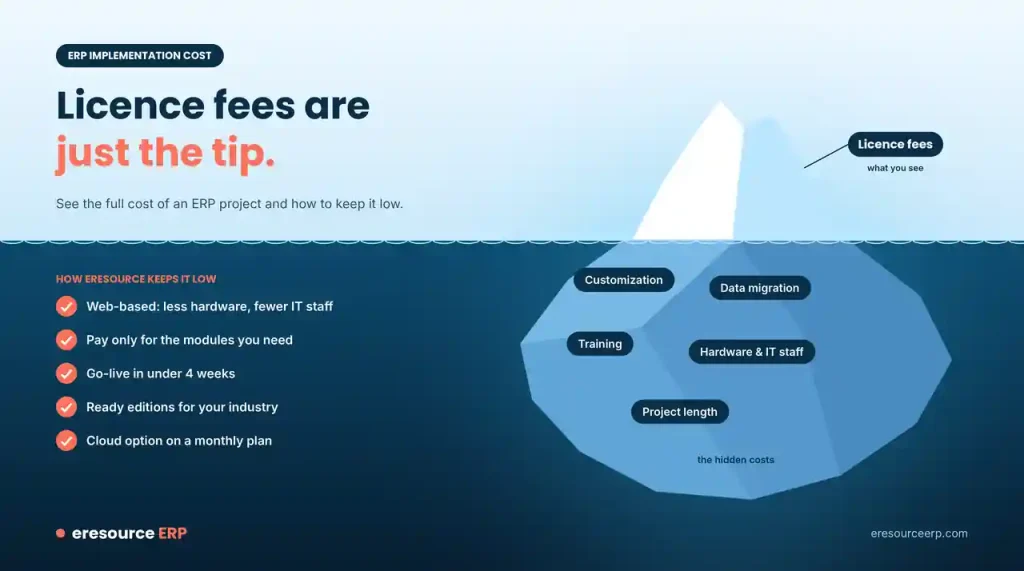
Many firms delay a new ERP for one reason: they fear a large bill. Yet licence fees are only part of the cost. Setup, customization, data migration and training can add much more. In this post, we explain what drives ERP implementation cost and how eresource keeps it low. We also show why staying on an old system can cost more than moving.
Why ERP Implementation Cost Worries Buyers
When companies choose a new ERP, the cost of putting it in place is often their biggest worry. In the past, customization was costly, and it caused problems with every upgrade.
Many firms also face a cash crunch or other pressing needs. Above all, they fear a failed project. So they put off the decision, even when their current system holds them back. As our post on why ERP is a powerful tool explains, success starts with your processes, not the software.
What Drives the Cost of an ERP Project
Look at the total cost of ownership, not just the licence price. The main cost drivers are:
- Licences or subscription: These depend on users and modules.
- Customization: Custom code needs development, testing and rework at each upgrade.
- Data migration: Someone must clean and load your old records.
- Training: Staff need time to learn the new system.
- Hardware and IT staff: On-premise systems need servers and people to run them.
- Project length: Every extra month adds consultant days and running costs.
For a closer look at pricing models, read our guide to ERP software price.
The Hidden Cost of Staying on a Legacy System
Some companies still run a legacy system that its vendor no longer supports. Others have simply outgrown their system as transaction volumes and complexity rise.
In both cases, staff build workarounds and spreadsheets to fill the gaps. Errors creep in, and decisions slow down. Over time, these hidden costs can exceed the price of a new system. That is why IT teams must make the case to management. A next-generation ERP system keeps the firm competitive and delivers return on investment.
Customization Without the Old Problems
eresource has learned from the old problems with ERP customization. Instead of heavy custom code, it relies on configuration. For instance, the Azaalea platform builds custom screens, fields and reports in hours rather than weeks.
As a result, we can tailor the system without changing your key business processes. Our implementation team also manages each change through clear project management. Still, keep custom work to what you truly need. Read why you should not customize your ERP too often.
How eresource Keeps ERP Implementation Cost Low
eresource cuts the biggest cost drivers in several ways:
- Web-based design: You need less hardware and fewer IT staff. See why it counts as a cost-effective ERP.
- Modular choice: You pay only for the modules you need. Learn more about modular ERP.
- Fast go-live: Our 3X faster implementation method aims for go-live in under four weeks.
- Ready industry editions: Much of the setup already exists for your sector.
- Cloud option: You can run cloud ERP on a monthly plan instead of a large upfront spend.
Upgrade, Connect or Replace
Not every firm needs to replace everything at once. Some prefer to keep parts of their current setup for now.
In that case, eresource can connect with existing tools through IoT and open APIs. It can also add workflow, business intelligence and reporting tools on top. Then you can move the remaining parts across when you are ready.
A Good Time to Improve Your Processes
A new ERP gives you the best chance to rethink how you work. So if you feel confident about the future, now is a good time to update your processes and systems together.
Good change management helps your team adopt the new way of working. Read more about ERP change management and the significance of ERP implementation.
5 Tips to Control ERP Implementation Cost
Follow these steps to keep your project on budget:
- Fix the scope early: Agree on must-have features before setup starts.
- Configure before you customize: Use standard settings first and code only the gaps.
- Clean your data first: Remove duplicates before migration, not after.
- Train key users early: They can then coach the rest of the team.
- Get a clear quote: Ask for costs and timelines in writing, phase by phase.
Get a Clear ERP Implementation Cost From eresource
eresource helps companies of every size move to ERP without a heavy bill. Ask our team about current implementation offers. To get a cost estimate for your business, start with a free ERP assessment or book a free ERP demo.
Also Read – ERP for Construction Industry
FAQs About ERP Implementation Cost
How much does ERP implementation cost?
It depends on the number of users and modules and how much customization you need. The state of your data and the training required also matter. Cloud plans also cost less upfront than on-premise setups. A free ERP assessment gives you an estimate for your business.
Why is ERP customization so expensive?
Custom code needs development and testing. It often breaks during upgrades, so you pay for rework again and again. Configuration costs far less, because it uses settings the system already supports.
Is it cheaper to keep our legacy system?
In the short term, it may seem cheaper. However, old systems create hidden costs, such as workarounds, errors, slow decisions and costly support. Over time, these can exceed the price of a new ERP.
How does eresource keep implementation cost low?
eresource relies on configuration instead of custom code. It runs on the web, so you need less hardware. You also pay only for the modules you need, and the 3X method aims for go-live in under four weeks.
Can eresource work with our existing systems?
Yes. eresource can connect with other tools through open APIs. So you can keep parts of your current setup and move them across later.



