


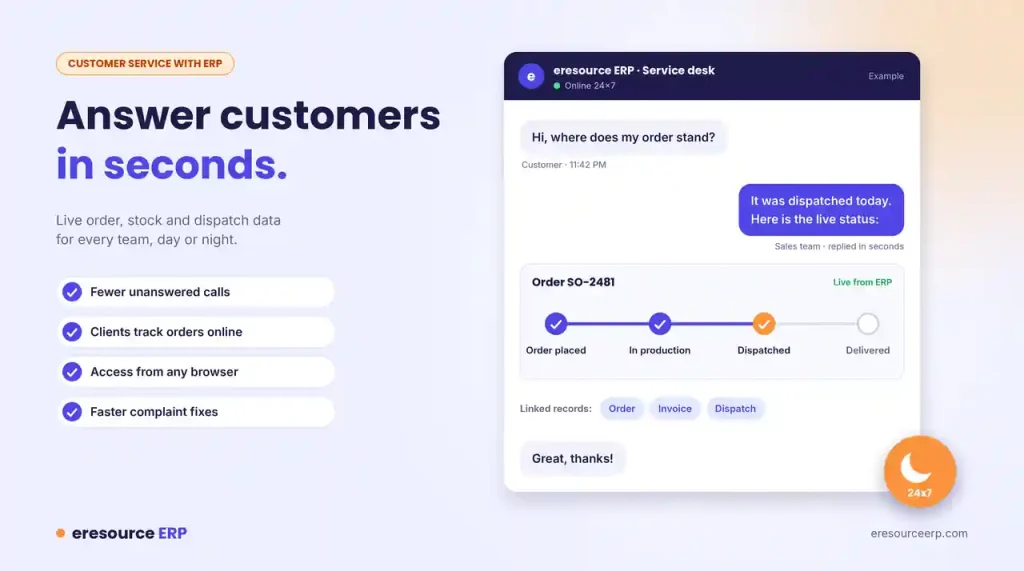
Customers today expect fast, accurate answers at any hour. When order details sit in separate files, staff struggle to reply, and calls go unanswered. Better customer service with ERP starts when every team can see the same live information. In this post, we explain how web-based eresource ERP helps you respond faster and keep customers informed. We also share simple steps to raise your service levels.
Role of ERP Software in Customer Service
Good customer service depends on good information. An ERP links sales, stock, production, dispatch and accounts in one system.
So when a customer asks where an order stands, staff can answer in seconds. They no longer need to call the factory or search old emails. Today, the internet is central to almost every business. A web-based ERP puts this information online for your whole team. That is the heart of customer service with ERP.
Faster Customer Service With ERP, Day or Night
eresource provides information over the web at any time of day or night. As a result, it cuts down on unanswered calls and endless phone tag.
Quick access also speeds up decisions. When a client raises an issue, managers can check the facts and act at once. In short, nobody loses valuable time waiting for a report.
Keep Customers Informed About Their Orders
With eresource, you can share job status reports with clients over a secure website. Clients can also place or change orders and releases online.
This makes your team far more responsive to customer needs. Customers see progress for themselves, so they call less often. Meanwhile, the sales module keeps every order, quote and delivery date in one place.
Customer Service With ERP, Wherever You Work
Web-based ERP also helps people outside the office. Users at other branches, company executives and sales representatives can all reach the system through any browser. This is far easier than older terminal-based setups.
In addition, the mobile ERP app puts customer and order details on your phone. Read how modern systems give teams greater working freedom. You can also see how ERP supports sales teams in the field.
Pair ERP With CRM to Resolve Complaints
Customers also want quick fixes when something goes wrong. With eresource, staff can open the order, invoice and dispatch record behind each complaint.
Then they can solve the problem whenever the customer gets in touch. For a full view of every customer, connect ERP with eresource CRM. Learn more about ERP and CRM integration.
Lower Costs and a Quick Start
Choosing the right ERP matters, because each package costs and works differently. A web-hosted system needs a smaller upfront spend, and you pay in predictable amounts over time. You can then invest the savings back into your business.
Moreover, eresource comes ready to use from the first day, much like off-the-shelf software. Our 3X faster implementation method aims for go-live in under four weeks. Read how to choose an ERP that brings attractive ROI.
Good Service Needs Efficient Operations
Personal service alone will not keep customers happy if your operations run poorly. Late orders and wrong invoices undo the best service desk.
In other words, strong customer service with ERP needs smooth operations behind it. That is why firms need an effective, web-enabled ERP that integrates their information and raises efficiency. See how ERP software improves business performance. A well-run system can also lift productivity with ERP across every team.
5 Steps to Improve Customer Service With ERP
Follow these steps to put your ERP to work for customers:
- Keep all customer data in one system: Remove side spreadsheets and personal contact lists.
- Give front-line staff live access: Let them see orders, stock and dispatch status.
- Set response targets: Track them on dashboards built with Dashboard Studio.
- Share updates early: Tell customers about delays before they have to ask.
- Review complaints every month: Find the common causes and fix them at the source.
Deliver Better Customer Service With ERP
eresource helps you answer faster, keep promises and win repeat business. To see how it fits your service team, book a free ERP demo.
Also Read – ERP for Plastic Industry
FAQs About Customer Service With ERP
How does ERP improve customer service?
An ERP puts sales, stock, production, dispatch and accounts in one system. Staff can answer questions about orders, delivery dates and invoices in seconds. They also give accurate promises, because the figures are live.
Can customers check their order status online?
Yes. With eresource, you can share job status reports with clients over a secure website. Clients can also place or change orders and releases online, so they call your team less often.
What is the difference between ERP and CRM for customer service?
CRM tracks leads, contacts and conversations with each customer. ERP runs the orders, stock, dispatch and billing behind them. Together, they give your team a complete view of every customer. Learn more about ERP and CRM integration.
Can sales staff use eresource ERP away from the office?
Yes. Because eresource runs on the web, staff can log in from any browser. The mobile ERP app also puts customer and order details on their phones.
How quickly can we start using eresource ERP?
Our 3X faster implementation method aims for go-live in under four weeks. You can book a free demo to see how the system fits your service team first.



