


ERP for Sales Teams: How One System Helps You Sell Faster and Serve Better
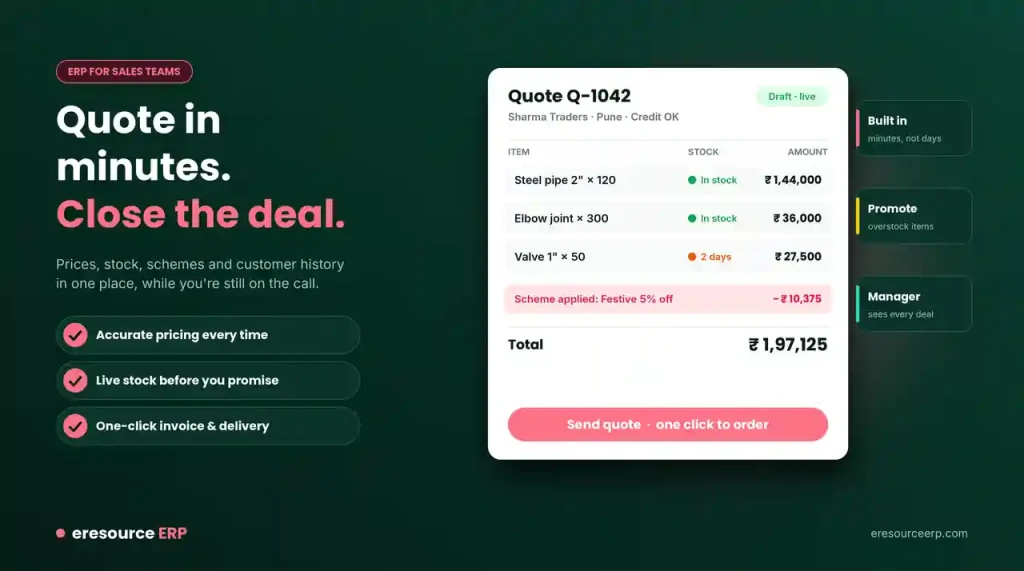
One of the most important parts of any ERP system is its link to sales. Customers now expect quick answers, and a fast reply often wins the deal. That is why ERP for sales teams has become so valuable. It gives reps the prices, stock and customer details they need to build a complete quote in minutes.
In this post, we explain how ERP changes daily sales work. We also share tips for rolling it out to your own team.
Why Sales Teams Need ERP
A quick response to customers is now a key part of any winning business plan. For this reason, companies want tools that can build quotes listing every product a client may need.
ERP does more than support daily sales tasks, though. It also helps leaders make major decisions, because it shows the full picture behind every deal. Learn how this creates a real competitive advantage of ERP.
What ERP for Sales Teams Includes
With eresource, your sales team gets everything in one place:
- Price lists: Current prices for every product and customer group.
- Customer details: Contact history, past orders and payment status.
- Orders and invoices: Every sales order and invoice, from quote to payment.
- Special offers: Active schemes and discounts, ready to apply.
The sales module and eresource CRM share this data with the rest of the business. So every rep works from the same facts.
Why Every Business Now Needs ERP
In a global market, ERP has become a basic need for almost every company. Many experts say you need it to compete in every corner of the market.
The reason is simple. ERP does not look at just one part of the business. Instead, it covers all the factors that leaders must weigh before they make an important decision.
From Order-Takers to Smart Sellers
Without good tools, sales staff often work like machines that only take orders. ERP changes this. It gives them the facts to think, plan and solve problems for each client.
At first, learning the system takes some effort. However, with proper training and a little practice, reps soon use it with confidence. In turn, they give clients a well-organised, detailed experience at every step. An easy-to-use ERP makes this learning curve much shorter.
Faster Orders, Fewer Errors
With ERP, a rep can create an order and share it with everyone involved in seconds. This saves time and cuts paperwork.
Moreover, all staff work from the same information. As a result, there is far less chance of mistakes between one step and the next.
Start With the People Who Manage Stock
When your ERP rollout begins, bring in the people who handle stock early. They are the first to know when a product will run short or when another will pile up.
With that insight, the system can guide sales staff to promote items you have too much of. In this way, you clear extra stock before it ties up cash. The store module keeps these stock levels live for everyone.
One-Click Invoicing and Delivery
ERP turns invoicing and delivery into a one-click task. As soon as a rep enters an order, stock, prices and discount options appear. So the rep can check them while still talking to the client.
The order details then reach every other team, complete and correct. So the next steps, from packing to billing, move much faster. See how this helps you reduce cycle time.
Benefits of ERP for Sales Teams
Here is what your sales team gains:
- Faster quotes: Reps build complete quotes in minutes.
- Accurate pricing: Prices and discounts always match the latest rules.
- Live stock: Reps check stock before they promise a date.
- Fewer errors: One set of data removes retyping mistakes.
- Less paperwork: Orders, invoices and approvals move digitally.
- Clear oversight: Managers can track the progress of every deal at any time.
How to Roll Out ERP for Sales Teams
Follow these steps for a smooth start:
- Involve sales and stock staff early: Ask what slows them down today.
- Load clean data: Check price lists and customer records before you move them.
- Configure, do not customize: Use standard features where you can. Read why you should not customize your ERP frequently.
- Train every rep: Include field staff who will use the mobile ERP app.
- Track results: Measure the time from quote to order each month.
See ERP for Sales Teams in Action
eresource has helped sales teams sell smarter since 2006. To see the sales tools on your own processes, book a free ERP demo.
Also Read – ERP software for construction
FAQs About ERP for Sales Teams
How does ERP help sales teams?
ERP gives reps price lists, customer details, live stock, orders and offers in one place. So they can build complete quotes in minutes.
Can sales reps check stock before promising a date?
Yes. Reps see live stock, prices and discount options while they talk to the client.
Why involve stock staff early in an ERP rollout?
Stock staff are the first to know when items run short or pile up. With their input, sales can promote overstocked items and free up cash.
Does ERP reduce sales errors?
Yes. Everyone works from the same data, so retyping mistakes between teams drop sharply.
Can field sales staff use eresource on the move?
Yes. The mobile app lets field staff take orders, check stock and update deliveries on the go.



