


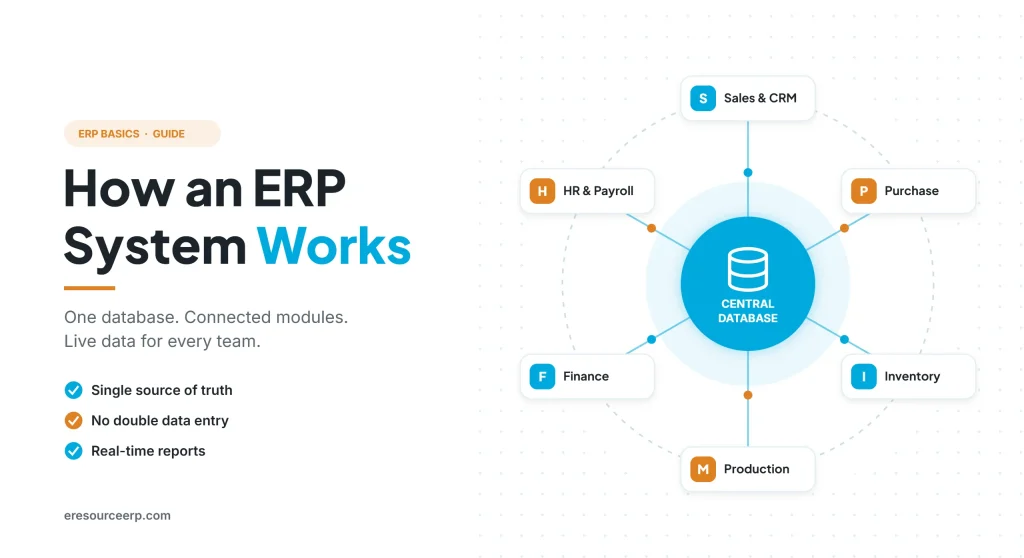
An ERP system works by keeping all business data in one central database and linking every team through connected modules. So one entry updates stock, accounts and reports at the same time. Earlier, most business owners in India asked, “What is ERP?” Today, however, the bigger question is “Which ERP should we choose?” To answer that well, it first helps to know how an ERP system works behind the screens. So this guide explains the parts, the data flow and a simple example, in plain words.
Key takeaways
- One database: every team reads and writes the same live data, so records always match.
- Connected modules: sales, purchase, stock, production, finance and HR also share each entry.
- Built-in workflows: approvals and alerts then move work to the next person.
- Live reports: as a result, managers see real numbers instead of last month’s spreadsheets.
How an ERP system works in simple terms
Simply put, ERP stands for enterprise resource planning. In other words, it is business software that brings all core processes onto one platform. Also, for a full definition, read our guide on what is ERP.
In practice, an ERP system works like a shared notebook for the whole company. When the sales team records an order, for example, the stores team sees it at once. Likewise, accounts can raise the invoice without re-typing any details. As a result, everyone uses one version of the truth.
The core parts of an ERP system
Overall, every ERP has a few core parts, and the table below shows what each one does:
| Part | What it does | Simple example |
|---|---|---|
| Central database | Stores every record once | One customer master for sales and accounts |
| Modules | Handle each business function | Sales, purchase, stock, production, finance, HR |
| Workflows | Route documents for approval | A large purchase order goes to the manager |
| User roles | Control who sees and edits what | Stores staff cannot change prices |
| Reports and dashboards | Turn data into decisions | Daily sales, cash and stock on one screen |
| Web and mobile access | Let teams work from anywhere | A site engineer raises a material request on a phone |
Together, these parts explain how an ERP system works as one connected whole instead of separate tools.
How an ERP system works step by step
For example, here is what happens when a customer places an order with a manufacturing company:
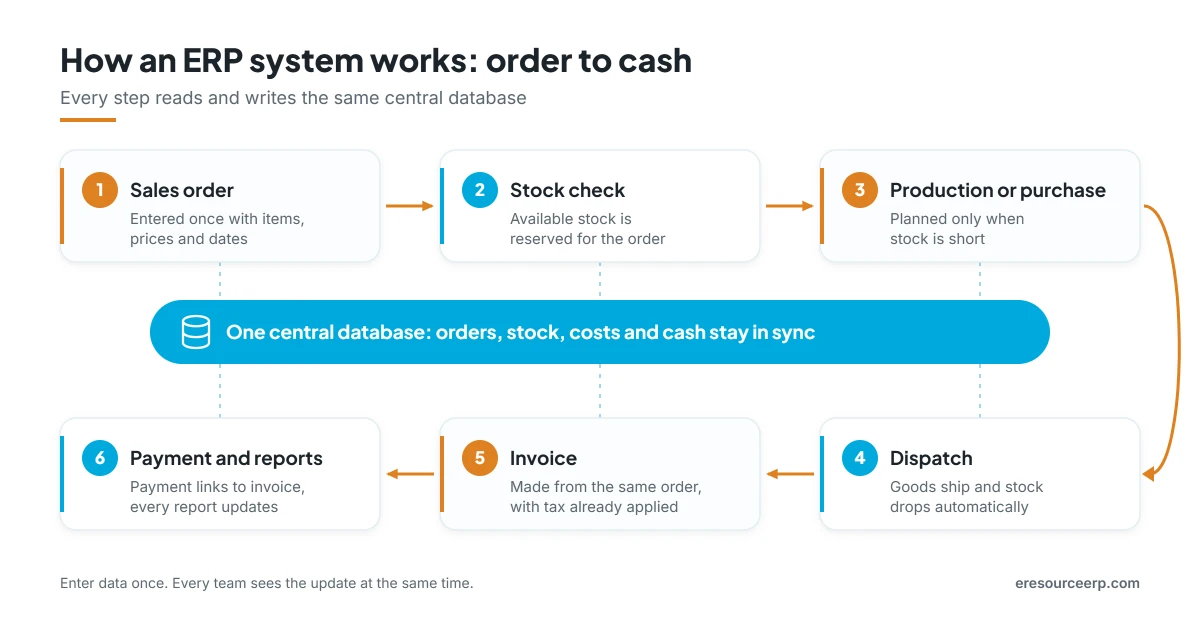
- Sales order: first, the sales team enters the order once, with items, prices and the delivery date.
- Stock check: next, the system checks available stock and reserves it for the order.
- Production or purchase: if stock is short, it then plans production or raises a purchase request.
- Dispatch: after that, stores pick, pack and ship the goods, and stock drops automatically.
- Invoice: then accounts create the invoice from the same order, with tax already calculated.
- Payment and reports: finally, the payment links to the invoice, and every report updates.
In short, nobody enters the same data twice. That is the real reason an ERP system works faster, and with fewer errors, than spreadsheets.
Which modules does an ERP connect?
Generally, most ERP software covers the same core areas. However, the exact list depends on your industry. For example, it usually includes:
- Finance and accounts: ledgers, GST, receivables and payables, as well as bank reconciliation.
- Sales and CRM: leads, quotations, orders and customer history.
- Purchase: requisitions, vendor quotes and purchase orders, then goods receipt.
- Inventory: stock levels and batches, as well as transfers between locations.
- Production: bills of material, work orders, job cards and quality checks.
- HR and payroll: attendance and leave, so salary and statutory reports stay accurate.
- Projects: budgets and costs, as well as progress for site or contract work.
Of course, each module has its own screens. Even so, the ERP system works behind them to keep every module linked. So, to see each one in detail, read our key ERP modules list. Also, see how clean master data in ERP keeps every module accurate.
Life before and after ERP
Without ERP, each team often keeps its own spreadsheet, so data rarely matches. In contrast, with ERP all teams share one live record. So here is how daily work changes:
| Task | Without ERP | With ERP |
|---|---|---|
| Checking stock | Call the store or open a file | Live stock on screen |
| Raising an invoice | Re-type order details | One click from the order |
| Approvals | Emails and phone calls | Built-in workflow with alerts |
| Month-end close | Days of matching data | Faster, because entries already link |
| Owner’s view | Reports arrive late | Live dashboard on mobile |
Moreover, errors drop because the ERP system works from data that people enter once. For a live example, read how eresource supports business processes in real time.
From “what is ERP” to “which ERP”: what to check
Once you understand how an ERP system works, choosing one becomes easier. Before you decide, therefore, check these points:
- Industry fit: ready processes for your sector, so you need fewer changes.
- Ease of use: simple screens, so your staff can learn quickly.
- Flexibility: no-code tools to add fields, forms and reports later.
- Total cost: license and users, as well as setup and support over five years.
- Access: cloud and web, plus mobile apps, so every location stays connected.
- Partner support: a team that helps with data migration and training too.
Finally, for a deeper guide, read about ERP selection, ERP implementation fundamentals and common ERP myths.
How an ERP system works in eresource
eresource is a web-based, AI-powered and no-code ERP with 37 integrated modules on one platform. It has also served businesses for 20 years, with 3,000+ go-lives. So here is how it puts these ideas into practice:
- One database: every module shares the same live data, so teams never type data twice.
- Industry editions: ready flows for manufacturing, process, construction, trading and logistics.
- AI assistance: smart insights and alerts, so teams can act early.
- No-code changes: add fields, screens and workflows yourself instead of waiting for developers.
- Unlimited users: one flat license, so every team can join from the start.
- Web and mobile access: teams work from the office, plant or site, as well as on the road.
Next, explore cloud ERP software in India, see our manufacturing ERP software, read how AI works in ERP, or browse all eresource ERP products.
Frequently asked questions
How does an ERP system work?
In short, it stores all data in one central database. Then connected modules for sales, purchase, stock, production and finance share every entry, so reports stay live.
What is the main purpose of ERP?
Above all, it connects departments, removes duplicate data entry and gives managers accurate, real-time information for decisions.
Can an ERP system work with other software?
Yes. Generally, most modern ERP software connects with other tools through integrations, imports and exports. For example, it can share data with e-commerce, banking or e-invoicing portals.
How long does an ERP rollout take?
Of course, it depends on scope. For instance, a cloud ERP for a small firm can go live in a few weeks, while larger rollouts take a few months.
Is ERP only for large companies?
No. In fact, small and mid-sized firms now adopt ERP fastest, because cloud options remove the cost of servers.
Does the eresource ERP system work on mobile?
Yes. For example, managers can check sales, stock and approvals, while staff raise requests from the eresource mobile app.
Want to see how an ERP system works for your business? Book a free demo, or start with a free ERP assessment.
Also Read – What is ERP? Complete Enterprise Resource Planning Guide



