


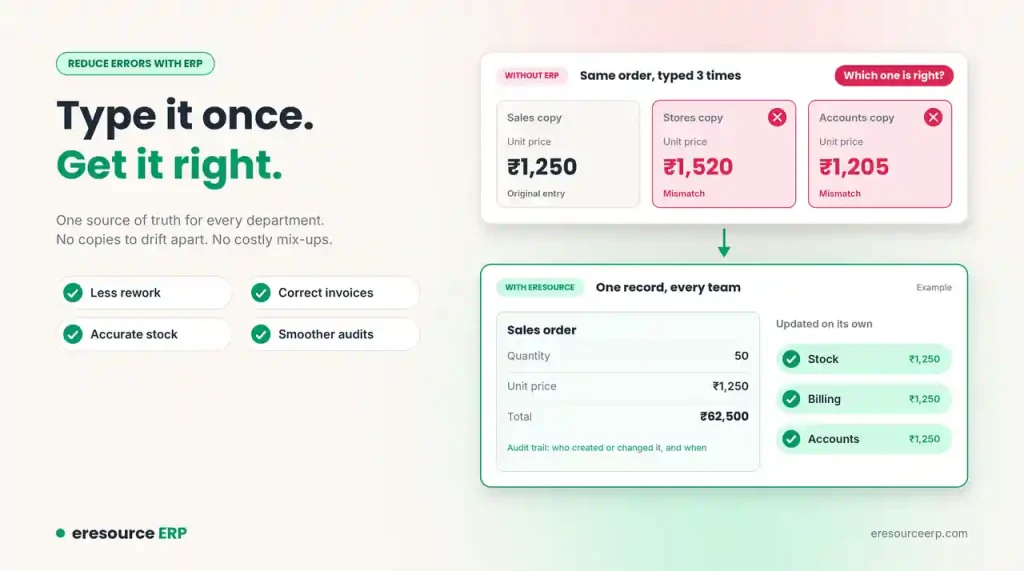
Every business makes mistakes. Yet many errors come from the same source: the same data typed again and again into different tools. When two records disagree, nobody knows which one is right. You can reduce errors with ERP by keeping all your data in one place. As a result, every team works from the same facts, and costly mix-ups become rare.
In this post, we explain where errors come from and how eresource removes them. We also share simple steps to keep your data clean.
Why Errors Creep Into Business Data
Most mid-sized firms grow one tool at a time. Sales has its system, stores has another and accounts uses a third. So staff copy data from one to the next by hand.
Each copy is a chance for a mistake. A wrong price, a missed digit or an old stock figure can lead to rework, late orders and unhappy customers. Worse still, these errors often stay hidden until month-end.
One Place for Every Record
eresource creates a single, central store of timely and accurate business data. Every entry from every person in every department goes into the same system.
In other words, you get a single source of truth. There are no separate copies to drift apart. So the gaps and errors that come from mismatched records simply disappear.
How to Reduce Errors With ERP Through Automation
Many routine tasks still run by hand in most firms. These tasks waste staff time and often lead to errors and rework. eresource automates them instead.
For example, when a sales order goes in, the system updates stock, billing and accounts on its own. Nobody retypes the order, so nobody makes a typing mistake. In turn, staff finish daily work faster and with more confidence. Read more about how this raises productivity with ERP.
Spot Weak Workflows and Fix Them
With all your data in one place, you can see which workflows work well and which ones do not. For instance, you might notice that one branch approves orders much more slowly than the others.
Then you can roll out the best practices across the whole company. Clear, standard processes leave less room for error. If you run several factories, see how a multi-plant ERP keeps every site on the same steps.
Keep Clean Records for Compliance
Government rules cover many areas, from staff records to environmental reports. Meeting them is far easier when your records are complete and correct.
eresource keeps a clear record of each transaction. It also shows who created or changed each entry, and when. As a result, audits run more smoothly. Learn more about the integrated finance module and its audit trail.
Run a Leaner Back Office
To stay ahead and protect profits, companies need to work as lean as possible. That means cutting duplicate and overlapping office tasks.
ERP removes much of this repeat work. As a result, mid-sized firms can lower their running costs a great deal. To see where the savings come from, read why ERP is an investment, not a cost.
Set Clear Goals and Track Them
Without ERP, firms often struggle to set formal goals or measure performance across the company. The numbers live in too many places.
eresource includes ready reports and leadership dashboards. So you can set clear targets and track progress against them every day. For deeper analysis, see ERP with business intelligence.
Benefits When You Reduce Errors With ERP
Clean data pays off across the business:
- Less rework: Staff fix fewer mistakes and spend more time on real work.
- Accurate stock: The store module shows true stock levels at every site.
- Correct invoices: Prices and quantities flow straight from the order.
- Smoother audits: Every change has a clear record.
- Better decisions: Leaders trust the numbers they see.
- Happier customers: Orders arrive right the first time.
Simple Steps to Keep Your Data Clean
Follow these steps to get the most from your ERP:
- Clean data before go-live: Fix duplicate customers, items and suppliers first.
- Set clear rules: Decide who can create or change each type of record.
- Remove side spreadsheets: Make the ERP the only place for daily work.
- Use drop-down lists: Limit free typing for codes, units and prices.
- Review exception reports: Check odd entries every week and fix them fast.
For more on access rules, read about ERP security.
Start to Reduce Errors With ERP Today
eresource helps mid-sized firms run with fewer mistakes and lower costs. It is also one of the most affordable ERP systems in India. To see it on your own processes, book a free ERP demo.
Also Read – Construction ERP Software
FAQs About How to Reduce Errors With ERP
How does ERP reduce errors?
ERP keeps all data in one place and updates every related record on its own. So staff stop retyping data, and typing mistakes drop sharply.
Why do businesses have data mismatches?
Most firms use separate tools for sales, stores and accounts. Staff copy data between them by hand, so the records drift apart.
Can ERP help with compliance?
Yes. eresource keeps a clear record of each transaction and shows who created or changed each entry. As a result, audits run more smoothly.
Does ERP help set business goals?
Yes. Ready reports and leadership dashboards let you set clear targets and track progress every day.
How can we keep ERP data clean?
Clean your data before go-live and set clear rules for who can change records. Also, remove side spreadsheets and review exception reports every week.



