


The right ERP for SMEs is not a smaller copy of a big-company system; it is one sized for how a growing business really works. For years, ERP felt like a tool only for large groups, because most systems were built for them. Today, however, small and medium businesses can run finance, stock, sales and HR on one platform without enterprise-level cost or complexity. This guide shows how to choose a right-sized ERP, what to check before you buy, and how to roll it out smoothly.
Key takeaways
- Fit beats size: pick a system built for your industry and team, not the one with the longest feature list.
- Watch the pricing model: per-user licenses get expensive as you grow, so a flat license often suits SMEs better.
- Speed matters: a long implementation drains a small team, so look for no-code setup and quick go-live.
- Plan for growth: new branches, users and compliance rules should not force a new system later.
Why SMEs need a right-sized ERP
Large ERP suites were designed for companies with big IT teams and long project budgets. So when a 50-person business buys one, it often pays for features it never uses. In addition, every change needs a consultant, and the project can drag on for months.
On the other hand, basic accounting software stops helping once you add a second warehouse, a production line or a sales team. Data then sits in spreadsheets, and nobody trusts the numbers. An ERP for SMEs fills this gap. It brings every department onto one database, yet it stays simple enough for a lean team to run.
Signs your business is ready for ERP
Most SMEs feel the need before they name it. For example, watch for these signs:
- Month-end closing takes days because data comes from many files.
- Stock figures in the system never match what sits in the warehouse.
- Sales teams promise delivery dates without knowing stock or production status.
- GST returns and e-invoices take hours of manual work.
- Owners wait for reports instead of seeing live numbers.
If two or more sound familiar, it is time to look seriously. For a longer list, read these 9 signs your business needs an ERP system.
Enterprise ERP vs ERP for SMEs: a quick comparison
The table below shows how a right-sized system differs from a typical enterprise suite:
| Area | Typical enterprise ERP | Right-sized ERP for SMEs |
|---|---|---|
| Licensing | Priced per named user | Flat license, often with unlimited users |
| Implementation | Many months, large consultant teams | Weeks, with pre-built industry processes |
| Changes | Custom code for each new form | No-code setup by your own team |
| Infrastructure | Servers and in-house IT | Web-based access from any browser |
| Training | Long courses for each module | Role-based training on daily tasks |
| Fit | Generic templates | Industry editions for your sector |
7 things to check when choosing an ERP for SMEs
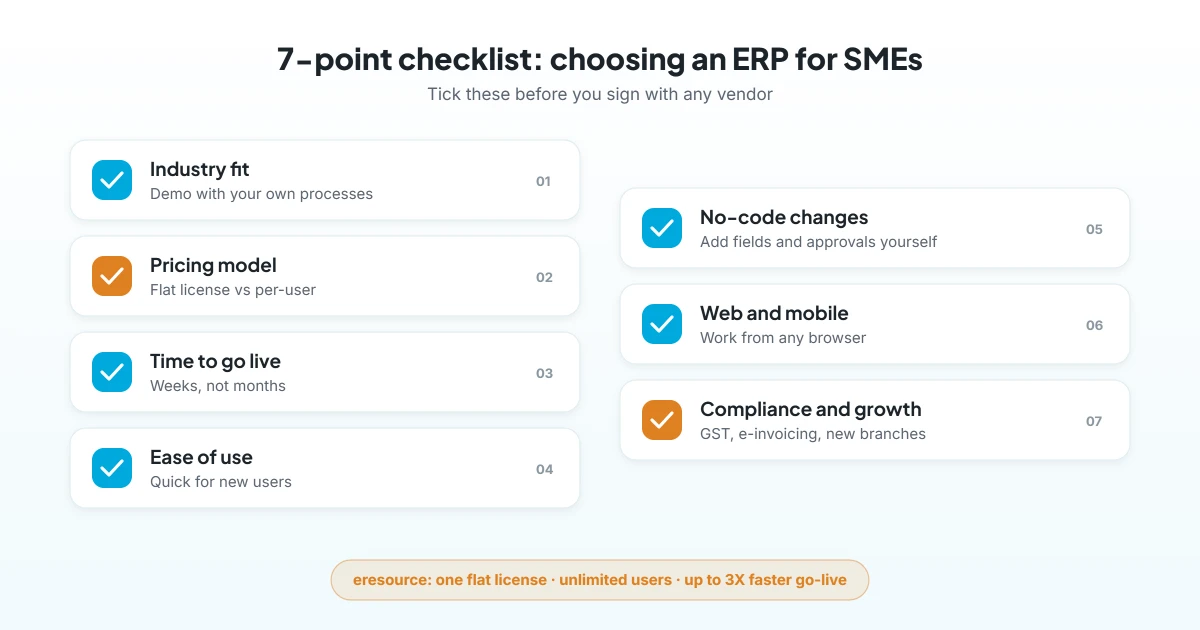
Use this checklist when you compare vendors. Together, these points decide whether the system helps you grow or holds you back.
1. Industry fit
Of course, a manufacturer, a contractor and a trader all work differently. So ask for a demo with your own processes, such as BOM and MRP for a factory or BOQ and billing for a contractor. A system with an edition for your industry needs far less setup.
2. Pricing model
First, check how the license is priced. Per-user pricing looks cheap at the start; however, it rises every time you add a store keeper or a sales rep. A flat license with unlimited users lets everyone work in the system, which also improves data quality.
3. Time to go live
Unlike large firms, small teams cannot pause the business for a long project. Therefore, ask for a step-by-step plan and typical timelines for companies like yours. Pre-configured processes and no-code setup cut weeks from the plan.
4. Ease of use and training
If screens feel complex, people go back to spreadsheets. So check how quickly a new user can raise an order or post an invoice. Also, ask what training the vendor gives before and after go-live.
5. Flexibility without coding
Your processes will also change as you grow. As a result, you need to add fields, approvals and reports without waiting for a developer. A no-code ERP for SMEs lets your own team make these changes.
6. Web and mobile access
Owners, sales teams and site staff rarely sit at one desk. In that case, a web-based ERP lets them log in from any browser, while a mobile app helps teams record work where it happens.
7. Compliance and growth
Rules also keep changing. For example, India requires GST e-invoices from businesses with aggregate turnover above ₹5 crore, a threshold in force since August 2023. Meanwhile, the government also raised the MSME limits in April 2025, so a growing company can now stay “small” or “medium” for longer. Your ERP should handle GST, e-invoicing and payroll rules today, and it should also scale to new branches tomorrow.
What an ERP for SMEs should cover
You do not need every module on day one. Still, the core set below covers most small and medium businesses:
- Finance and accounts: ledgers, GST, receivables, payables and cash flow.
- Inventory and purchase: stock by location, reorder levels and vendor management.
- Sales and CRM: leads, quotations, orders and invoices in one flow, as in eresource CRM.
- Production or projects: BOM, MRP and job costing for factories, or BOQ and billing for contractors.
- HR and payroll: attendance, leave and statutory payroll through eresource HRMS.
To see how these fit together, read our guide to key ERP modules.
How eresource fits small and medium businesses
eresource has built ERP for growing companies for more than 20 years, with 3,000+ implementations in 25+ countries. SMEs have long been among its main users. Here is why the platform suits them:
- One flat license, unlimited users: you pay per business, not per employee.
- No-code setup: modules and forms are configured without code, so go-live can be up to 3X faster than traditional ERP.
- Industry editions: Xcel for manufacturing, Nfra for construction and eTrade for trading, among others.
- Compliance built in: GST, ZATCA and e-invoicing, plus statutory payroll for India and the UAE/GCC.
- Web-based and AI-ready: teams log in from anywhere, and AzaaleaGPT flags what needs attention.
Want the numbers behind the decision? See how SMEs get a quicker ERP return, and explore the benefits of ERP for SMEs.
How SMEs can roll out ERP in 6 steps
A simple plan keeps daily work running while you switch. Follow these steps:
- List your pain points: first, note where time, stock or money leaks today.
- Shortlist two or three vendors: next, ask each one for a demo with your real data.
- Agree on scope and timeline: then start with the core modules and add more later.
- Clean your data: after that, fix item codes, customer records and opening balances.
- Train key users: train one champion per team, so they can support others.
- Go live and review: finally, track adoption and fix gaps in the first few weeks.
For more help, see why eresource is an easy to implement ERP.
Common mistakes to avoid
- Buying an enterprise suite and then using a fraction of it.
- Choosing on price alone, without checking per-user costs as you grow.
- Skipping a demo with your own processes.
- Leaving staff out of training, so they return to spreadsheets.
- Trying to launch every module at once.
Frequently asked questions
What is an ERP for SMEs?
It is a business system sized for small and medium companies. It connects finance, inventory, sales, purchase and HR on one database, without the cost and complexity of an enterprise suite.
When should an SME move to ERP?
Move when spreadsheets slow down closing, stock figures stop matching, or owners cannot see live numbers. Usually, this happens when you add branches, products or staff.
How much does ERP cost for an SME?
Overall, cost depends on modules, users and the pricing model. However, a flat license with unlimited users keeps costs steady as your team grows.
How long does SME ERP implementation take?
Generally, it depends on scope and data. With no-code setup and industry editions, eresource can go live up to 3X faster than traditional ERP.
Is eresource suitable for small businesses?
Yes. eresource suits small and medium businesses as well as larger groups. Also, one flat license covers unlimited users.
Does eresource handle GST and e-invoicing?
Yes. GST, ZATCA and e-invoicing are built in, along with statutory payroll for India and the UAE/GCC.
Ready to find your right-sized ERP? Book a free demo, or start with a free ERP assessment.
Also Read – Web-Based ERP for SMEs: Why It Is the Best Fit



