


PMS in oil and gas stands for preventive maintenance system, also called a planned maintenance system. It is a structured way to inspect, service and replace equipment on a schedule, so rigs, pipelines and plants keep running safely without surprise breakdowns. In this industry, even a short stoppage can mean a huge loss. Worse, it can put the safety of people on site at risk. So this guide explains what PMS in oil and gas means, the main types of maintenance, how an ERP-based system works and which numbers to track.
Key takeaways
- Plan, don’t react: routine checks cost far less than emergency repairs.
- Mix the methods: also, use calendar, usage and condition triggers for different assets.
- Connect the dots: link maintenance with spares, purchase and people in one system.
- Measure it: finally, track PM compliance, breakdowns and repair time every month.
What does PMS mean in oil and gas?
In simple terms, preventive maintenance is planned care of plant and equipment. It aims to extend equipment life and avoid unplanned repairs. Typical tasks include lubrication, cleaning, adjusting, painting and replacing small parts before they fail.
A PMS is the system that plans and tracks all of this work. In other words, it tells each team which asset needs which task, and when. As a result, PMS in oil and gas keeps equipment from ever reaching the breaking point. For a wider view, read about the plant maintenance module in ERP.
Why PMS matters in oil and gas
Oil and gas sites run pumps, compressors, turbines, valves and pipelines in harsh conditions, often far from towns. Therefore, a good maintenance plan matters more here than in most industries:
- Costly downtime: first, an idle rig or plant loses money every hour it stops.
- Safety: also, worn equipment can cause leaks, fires or injuries.
- Remote sites: parts, people and tools must reach the site on time.
- Inspections: regulators and clients expect clear maintenance records.
- Asset life: finally, regular care keeps costly equipment running for longer.
Earlier, the industry relied heavily on manual checks and paper logs. However, that took a lot of time and often missed problems. That is why so many companies now run PMS in oil and gas through software.
Types of maintenance in a PMS
A strong PMS in oil and gas mixes several triggers, because not every asset fails the same way. The table below shows the main types:
| Type | When it happens | Best for |
|---|---|---|
| Time-based | On fixed calendar dates | Valves, safety gear, fire systems |
| Usage-based | After set running hours or cycles | Engines, compressors, generators |
| Condition-based | When readings cross a limit | Pumps and other rotating equipment |
| Predictive | When trends point to a coming failure | Critical, high-value assets |
| Corrective | After a fault appears | Low-cost, non-critical items |
In practice, most firms use time and usage triggers for the bulk of assets. Then they add condition checks, such as vibration or heat, for the most critical ones.
How an ERP-based PMS works in oil and gas
Generally, an ERP-based PMS in oil and gas follows six steps, as the picture below shows:
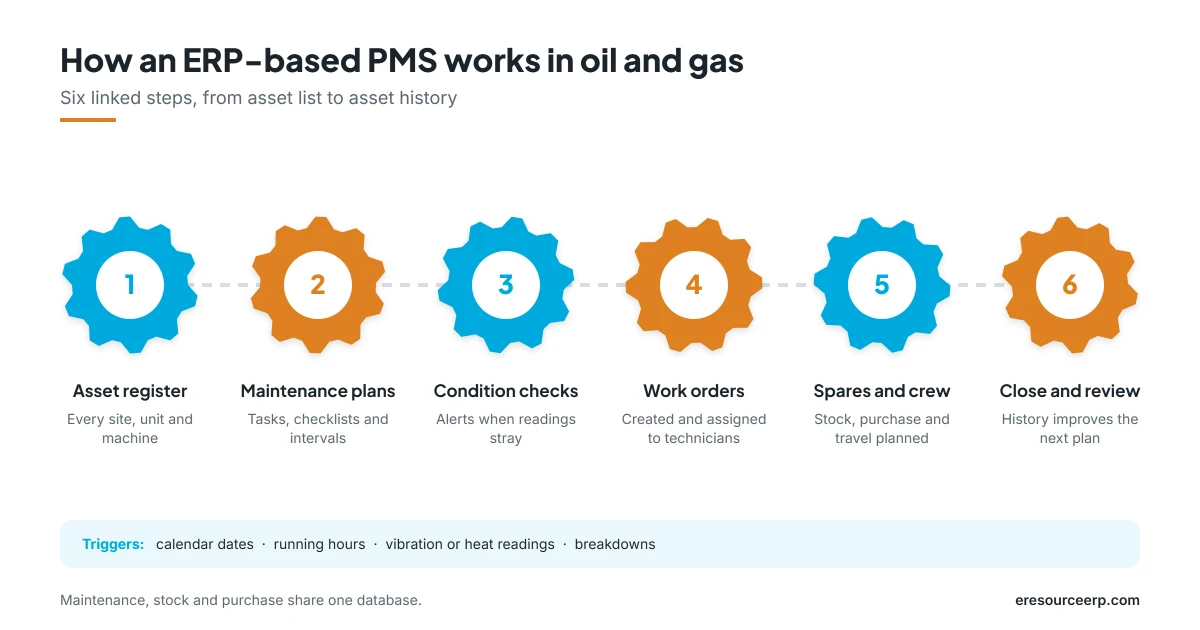
- Build the asset register: first, list every site, unit and piece of equipment with its key details.
- Set maintenance plans: next, define tasks, checklists and intervals for each asset.
- Monitor condition: then record readings such as vibration or temperature. When a value strays outside its range, the system raises an alert.
- Create work orders: after that, the system creates work orders from the schedule or from alerts, and assigns technicians.
- Plan spares and crew: also, check stock, raise purchase requests and plan travel to remote sites.
- Close and review: finally, record time, parts and cost, so the asset history improves the next plan.
Because maintenance, stock and purchase share one database, nothing falls through the gaps. For more, see the maintenance module in ERP and the asset management module.
Benefits of a preventive maintenance system
A well-chosen and well-run PMS in oil and gas makes clear economic sense. Here is why:
- Fewer breakdowns: problems are fixed while they are still small.
- Safer operations: in addition, regular checks lower the risk of leaks and accidents.
- Longer equipment life: lubricants, filters and parts last longer, and machines stay within design limits.
- Lower costs: similarly, planned jobs cost less than rush repairs and emergency parts.
- Better spare parts control: the right parts are in stock, without excess.
- Audit-ready records: finally, every job, reading and part is on file for inspections.
As a result, maintenance moves from a cost centre to a source of value. To see the wider impact, read how ERP helps reduce manufacturing costs.
KPIs to track
Above all, review a few clear numbers every month:
- PM compliance: first, the share of planned jobs done on time.
- Mean time between failures: how long equipment runs between breakdowns. See MTBF for more.
- Mean time to repair: also, how long it takes to fix a fault.
- Planned vs unplanned work: the higher the planned share, the better.
- Maintenance cost per asset: labour, parts and services for each machine.
- Backlog: finally, open jobs waiting for parts, people or approval.
For live views of these numbers, read about ERP business intelligence.
How to start with PMS
When you set up PMS in oil and gas, you do not need to cover every asset on day one. Instead, follow these steps:
- Rank your assets: first, list the equipment whose failure would hurt safety or output most.
- Use maker guidance: next, start with the service intervals the equipment maker recommends.
- Clean the data: then fix asset codes, locations and spare part links.
- Go mobile: after that, give technicians checklists on their phones, so they record work on site.
- Review and adjust: finally, change intervals based on real failure history.
Moreover, mobile access helps a lot on remote sites. So read about the pros of mobile ERP.
PMS in oil and gas with eresource
eresource is a web-based, AI-powered and no-code ERP with 37 integrated modules on one platform. It has also served businesses for 20 years, with 3,000+ go-lives. So here is how it supports PMS in oil and gas:
- Preventive to corrective: manage all equipment servicing on one platform.
- Automatic scheduling: also, plan preventive tasks based on usage or calendar, with alerts.
- Work orders: create work orders and assign technicians and resources.
- Spares and cost: track spare parts usage and service spend for each asset.
- Asset history: closed work orders update each asset’s service record.
- Live dashboard: finally, see status, downtime, service history and cost in one view.
To learn more, explore ERP for oil manufacturers, read about the ERP for the oil industry or browse all eresource ERP products.
Frequently asked questions
What is PMS in oil and gas?
In short, it is a preventive or planned maintenance system that schedules inspections, servicing and part changes before equipment fails.
What is the difference between preventive and predictive maintenance?
Preventive maintenance follows a set schedule. Predictive maintenance, on the other hand, uses readings and trends to act just before a failure.
How often should equipment be serviced?
Start with the maker’s recommended intervals. Then adjust them based on running hours, conditions and failure history.
What is PM compliance?
It is the share of planned maintenance jobs finished on time. Most teams aim to keep it as close to 100% as possible.
Can a PMS work at remote oil and gas sites?
Yes. For example, web and mobile access lets technicians view jobs and record work from the field.
Does eresource support preventive maintenance?
Yes. It schedules preventive tasks by usage or calendar, creates work orders and tracks spares, cost and asset history.
Want to see a PMS for your sites in action? Start with a free ERP assessment, or book a free demo.
Also Read – Plant Maintenance Module in ERP



