


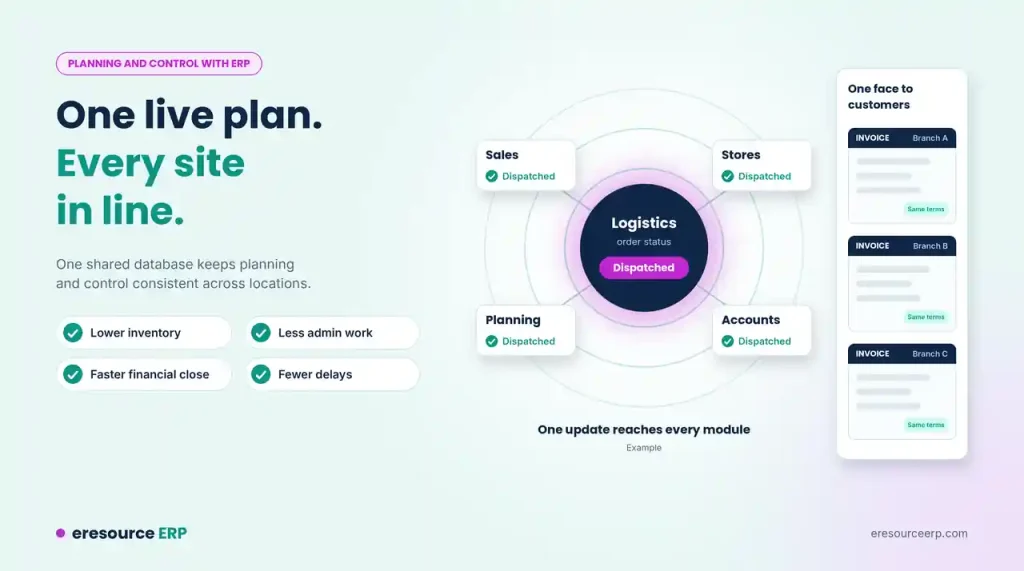
When each site and department keeps its own numbers, plans soon drift apart. Managers argue over whose figures are right, and control slips. Consistent planning and control with ERP starts with one shared, live database for the whole company. In this post, we explain how eresource links your locations and functions. We also share simple steps to keep every site in line.
Why Planning Slips in Multi-Site Firms
Today, many firms run production across several sites. Different teams, sometimes in different countries, make the parts of one product. Managing all this work is a complex task.
Without clear controls and procedures, operations can quickly slip out of hand. Orders run late, costs climb, and in the worst case products or even whole firms fail. Often, the root cause is a legacy system or separate tools that do not share data.
One Update Reaches Every Module
eresource works as one integrated ERP. It updates data between related processes and functions on its own.
For example, suppose you change the status of an order in the logistics module. All the other modules then show the new status at once. Nobody needs to update sales, stores or accounts by hand. As a result, you get up-to-the-minute information at your fingertips through a web-based ERP system. This is what sets a next-generation ERP system apart from older tools.
Planning and Control With ERP Starts With Shared Data
Because all data is online and live, everyone in the company works from the same information. Planners, buyers, storekeepers and finance staff all see the same orders, stock and costs.
This makes planning and control with ERP far more consistent than with a legacy setup. In addition, all users connect with each other inside one system. They share updates, approve requests and solve problems faster. See how this raises productivity with ERP. For live dashboards and alerts, read about real-time ERP.
Standard Processes at Every Location
eresource also lets you set standard processes across all your locations. With live data side by side, you can spot which site follows the best method and which one lags behind.
Then you can bring weaker sites in line with the most efficient ones. Over time, every branch and plant follows the same proven steps. If you run several factories, see how a multi-plant ERP balances demand and capacity across sites.
Show One Face to Your Customers
Consistent processes also change how the outside world sees you. Without ERP, a customer may get different documents, formats and prices from each branch or plant.
With one system, every location sends the same style of quotes, order confirmations and invoices. In other words, you present a single, professional image to every customer. The sales module helps keep prices and terms the same across branches.
Gains From Better Planning and Control With ERP
When your firm runs on one integrated system, leaders make better decisions. Many firms see the results in clear numbers:
- Lower inventory: Plans use live stock, so you hold less extra.
- Less admin work: Staff stop keying the same data into several tools.
- Faster financial close: Entries post as work happens, so the books close sooner. See the integrated finance module.
- Fewer delays: Teams spot problems early and fix them before orders slip.
- Better decisions: Leaders trust one set of figures.
For a wider look at these savings, read about operational efficiency with ERP.
5 Steps to Better Planning and Control With ERP
Software alone will not fix weak processes. As our post on why ERP is a powerful tool explains, you should review your processes first. Then follow these steps:
- Map each site’s process: Write down how every location plans, buys and makes goods today.
- Pick the best method: Choose one proven process for each area and use it everywhere.
- Use common codes: Give items, customers and suppliers the same codes at every site.
- Set clear roles: Decide who plans, who approves and who records each step.
- Track plans against actuals: Review the gaps every month and adjust.
For more on planning a rollout, read the characteristics of effective ERP implementation.
See Planning and Control With ERP in Action
For multi-site firms, an effective ERP is now an essential business tool. It also keeps you ready for the latest ERP trends, such as mobile access and IoT. Our 3X faster implementation method aims for go-live in under four weeks. To see it on your own processes, book a free ERP demo.
Also Read – ERP Software for Manufacturing Industry
FAQs About Planning and Control With ERP
What does planning and control mean in ERP?
Planning sets what you will make, buy and sell, and when. Control checks the actual work against that plan and fixes any gaps. An ERP links both through one live database, so plans and results always use the same figures.
How does ERP keep planning consistent across locations?
Every site works in the same system and follows the same standard processes. So planners at each location see the same orders, stock and costs. For firms with several factories, a multi-plant ERP also balances demand and capacity across sites.
What happens when I update an order in one eresource module?
All related modules show the change at once. For example, if you change an order's status in logistics, sales, stores and accounts see the new status right away. Nobody needs to update the other modules by hand.
Why is ERP better than a legacy system for planning and control?
Legacy systems and separate tools each keep their own copy of the data. Those copies drift apart, so plans rest on old or wrong numbers. An integrated ERP keeps one live record that every team shares, which makes planning and control far more consistent.
How long does it take to set up eresource ERP?
Our 3X faster implementation method aims for go-live in under four weeks. The exact time depends on how many sites and modules you need. You can book a free demo to see the system on your own processes first.



