Free ERP Demo: See eresource Live on Your Own Processes
For many companies, the hardest part of buying ERP is the first step. You need to understand what the system really does before you commit. A live ERP demo gives you that clear picture in under an hour. In this post, we explain why a demo matters. We also cover what happens in an eresource demo and how to prepare.
Why Management Needs a Clear View of ERP
Large and growing companies often struggle to see the full picture of their own operations. Each team follows its own routine, so data sits in different places. In contrast, a uniform system, where everyone follows the same process, makes this much simpler. That matters even more as companies grow across regions and borders.
An industry-specific ERP like eresource also becomes a source of insight. For instance, it gives managers the information they need to shape future strategy. In addition, an integrated ERP system helps the business simplify and develop its processes over time.
Why a Live ERP Demo Beats a Brochure
Today, technology decisions sit with top management. In most firms, the owner or board makes the final call on ERP. However, many leaders know little about ERP and must rely on their IT team.
A live demo closes this gap. Instead of reading claims, you watch the system handle real work. For example, you see how data moves between sales, stores, production and accounts. You can also check how teams share work in a collaborative business process.
Above all, a demo shows the quality of the product. As a result, you see the workflow, the screens and the reports for yourself. Then you can spot any gaps early and ask how the vendor would fill them.
What Happens in an eresource ERP Demo
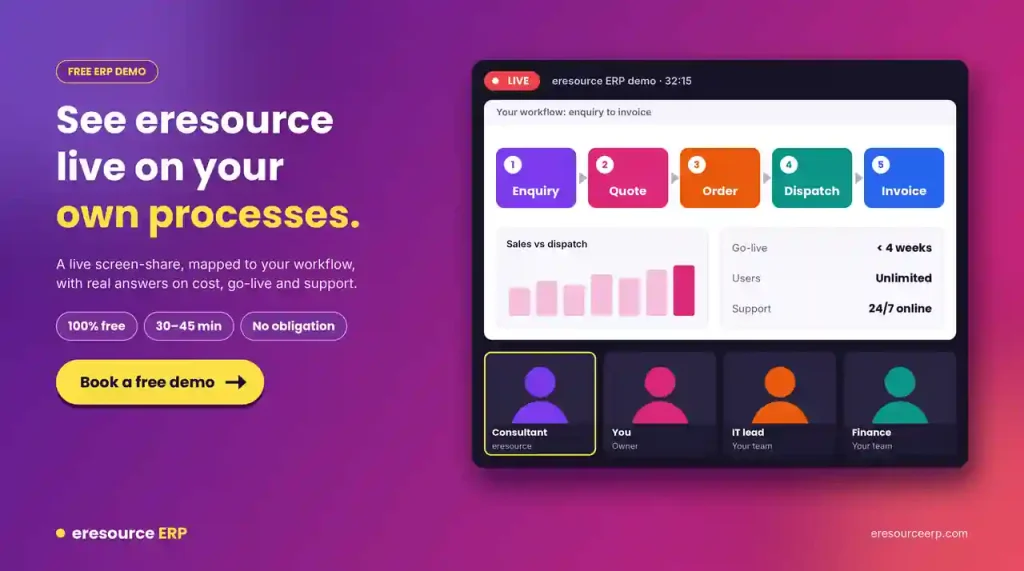
eresource runs every demo as a live, interactive screen-share session. Here is what to expect:
- Your processes, live: A consultant maps your own workflow, such as enquiry to dispatch or tender to billing.
- A short session: Most demos take 30 to 45 minutes.
- Real answers: We discuss pricing, go-live timelines and support during the call.
- Deeper follow-ups: If you need more detail, we schedule focused sessions on production, projects, finance or HR.
- No cost: The demo is completely free, with no obligation to buy.
How to Prepare for Your ERP Demo
A little preparation helps you get far more from the session, so plan ahead. Follow these steps:
- Invite the right people: Bring a decision-maker, your IT lead and one or two key users from finance or operations.
- List your pain points: Write down the three to five problems that cost you the most time or money.
- Share your needs early: Use the requirements box on the booking form to describe your processes.
- Prepare questions: Plan what you want to ask about cost, go-live and support.
- Note any gaps: During the demo, record anything the system does not cover yet.
Questions to Ask the Vendor
Also, these questions help you compare ERP vendors fairly:
- How does data flow from one module to the next?
- Can our team change forms and workflows without writing code?
- How long will it take to go live? For example, eresource’s 3X faster implementation aims for under four weeks.
- What support do we get after go-live?
- What will the system cost for our users and sites? Our guide to ERP software price explains the main cost factors.
How ERP Shapes Three Areas of Your Business
Companies usually move to ERP for technical or strategic reasons. In practice, you cannot separate the two, because each one affects the other. So a good ERP project improves three areas at once:
- Business development: It supports new business strategies and growth plans.
- Operational development: It improves your business processes and the links between departments.
- System development: It gives you a modern IT base, with ERP at its core.
Book Your Free ERP Demo
Finally, are you ready to see eresource on your own processes? Book a free ERP demo, and our team will confirm a time within business hours. You can also email us at sales@eresourceinfotech.com or call +91 77389 72222.
Also Read – ERP for Plastic manufacturing
FAQs About the eresource ERP Demo
Is the eresource ERP demo free?
Yes. The demo is completely free, and you have no obligation to buy.
How long does an ERP demo take?
Most eresource demos take 30 to 45 minutes. If you need more detail, we can schedule a focused follow-up session.
Is the demo online or in person?
It is a live, interactive screen-share session, so you can join from anywhere. A consultant shows your own workflow in the system.
Who should attend an ERP demo?
Bring a decision-maker, your IT lead and one or two key users from finance or operations. This way, every view gets a voice.
How do I book an eresource ERP demo?
Fill in the form on the book demo page, and our team will confirm a time. You can also email sales@eresourceinfotech.com.