


Fleet Management ERP Modules: How Each One Runs a Part of Your Fleet
A transport business has many moving parts. Vehicles, drivers, trips, fuel, tyres, paperwork and billing all need daily attention. eresource 3GL splits this work into fleet management ERP modules. Each module mirrors one major area of a fleet organisation, so every team gets the tools it needs.
In this guide, we explain what each module does and how they work together. We also show which modules to start with.
How Fleet Management ERP Modules Work Together
All modules share one database. So when a driver ends a trip, the system updates fuel, driver records, billing and accounts at once. Nobody types the same data twice.
The setup starts with a master configuration. Here, you define each vehicle, route, driver and contract only once. After that, every module uses the same records. For a general overview of the field, see this introduction to fleet management.
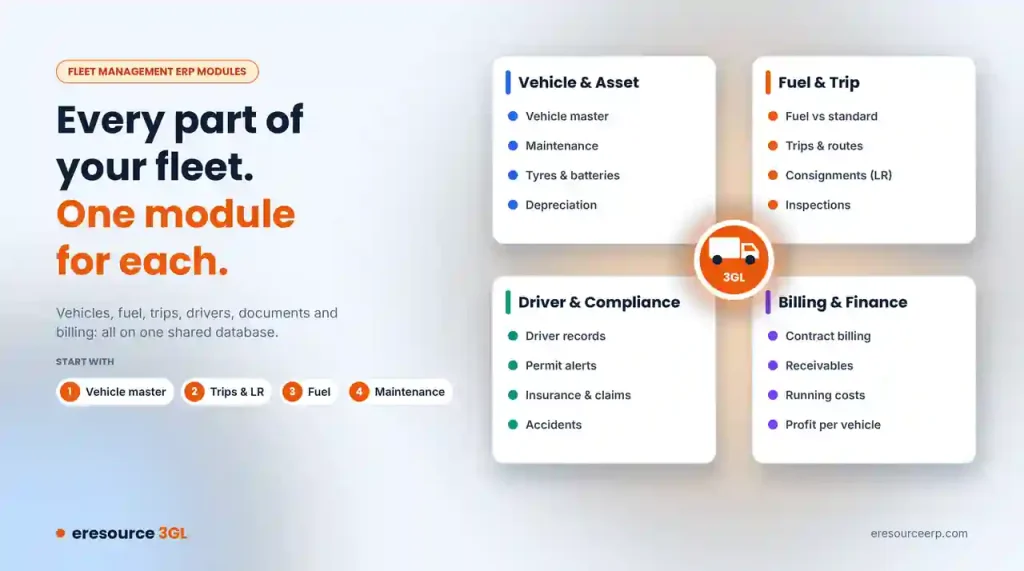
Vehicle and Asset Modules
These modules keep track of every truck, trailer and tanker you run:
- Vehicle master: Record registration, capacity and fuel type. Also, mark each vehicle as owned, hired or leased, and attach trailers.
- Maintenance: Keep a full service history for each vehicle. In addition, predictive alerts warn you before a service falls due, and you can follow each job in the workshop.
- Tyres and batteries: Track each tyre from fitting to retreading and scrap. Then compare the cost per kilometre across brands. Similarly, the module tracks battery charge cycles and sends reorder alerts.
- Asset accounts: Record depreciation for each vehicle, so your books show its true value.
Fuel and Trip Modules
Fuel and trips decide whether a fleet makes money. These modules give you tight control over both:
- Fuel: Record every fuel issue by vehicle and compare it against a set standard. GPS data can also confirm each fill, which helps you spot theft.
- Trips and routes: Capture each trip’s start and end. Then compare planned and actual time against a standard route, with distance and tolls mapped.
- Consignments (LR): Link each consignment note to its contract, vehicle and route. As a result, you can follow every load from booking to delivery.
- Inspections: For example, drivers fill digital checklists before and after each trip, with photos as proof.
Driver and Compliance Modules
Drivers and documents carry a lot of risk. These modules keep both under control:
- Driver management: Store each driver’s details and licence. Then assign drivers to vehicles and score their performance.
- Compliance alerts: Get reminders before permits, fitness certificates, pollution certificates or licences expire.
- Insurance and claims: Keep each policy on record, get renewal reminders and link claims to accidents.
- Accident handling: When a truck has an accident, report the damage, move the cargo and assign a spare vehicle quickly.
Billing and Finance Modules
Every trip should turn into an invoice without delay. Therefore, eresource links operations straight to finance:
- Contracts and billing: Bill by load, trip, distance or rental, and let the system raise invoices on its own. For rentals, it also tracks on-hire and off-hire dates.
- Finance: Because trips feed the books, receivables, payables and running costs stay up to date.
- Profit per vehicle: See which trucks and routes make money and which ones lose it.
Mobile App and AI Alerts
Your fleet spends its day on the road, not in the office. So the eresource mobile app puts key tasks in each driver’s pocket. Drivers can accept trips, complete inspections, confirm fuel and capture proof of delivery. The app even works offline and syncs later.
Meanwhile, AzaaleaGPT AI watches your data in the background. It flags fuel anomalies, delayed vehicles and upcoming maintenance before they turn into problems. You can also link GPS and telematics devices through open APIs.
Which Fleet Management ERP Modules Do You Need First?
However, you do not need every module on day one. Most fleets start with these four:
- Vehicle master: It comes first because every other module uses it.
- Trips and consignments: They capture your daily work and revenue.
- Fuel: It controls your biggest running cost.
- Maintenance: It cuts breakdowns and downtime.
After that, add tyres, compliance, billing and the mobile app as you grow. This modular ERP approach keeps your project within budget. For the common problems these modules solve, read about fleet management challenges.
See eresource Fleet Management ERP Modules in Action
eresource has built transport ERP software for 20 years. To see the full product, visit our fleet management ERP software page. Or book a free demo to see the modules with your own vehicles and routes.
Also Read – Transport and Logistics ERP
FAQs About Fleet Management ERP Modules
What are the main fleet management ERP modules?
The main modules cover vehicles, maintenance, tyres, fuel, trips, consignments, drivers, compliance, insurance, billing and finance. A mobile app and AI alerts support them.
Do all fleet modules share the same data?
Yes. All eresource modules share one database. So a single trip updates fuel, driver records, billing and accounts at once.
Which fleet modules should we start with?
Most fleets start with the vehicle master, trips and consignments, fuel and maintenance. Then they add tyres, compliance, billing and the mobile app later.
Can drivers use the system on their phones?
Yes. Drivers use the mobile app to accept trips, complete inspections, confirm fuel and capture proof of delivery. It also works offline.
Does eresource work with GPS devices?
Yes. Open APIs connect GPS and telematics devices, and GPS data can confirm each fuel fill.



