


Clear manufacturing ERP requirements help you choose a system that fits your plant, not just one that looks good in a demo. Many manufacturing firms still run on spreadsheets and separate software for stores, production and accounts. As they grow, stock goes missing, deliveries slip and nobody knows the true cost of a job. So before you speak to vendors, write down what you need. This checklist covers the functional, technical and commercial requirements that matter most.
Key takeaways
- Start with your processes: list how you plan, make, check and ship, and then match the ERP to that.
- Cover three areas: functional, technical and commercial requirements all affect success.
- Match your type of manufacturing: discrete and process plants need different features.
- Check the license model: per-user pricing can limit who uses the system later.
Why manufacturing firms need an ERP system
A growing plant creates more orders, more materials and more data every month. However, spreadsheets cannot link a sales order to material planning, production and costing. As a result, teams spend hours matching numbers, and managers decide with old data.
Common warning signs include:
- Stock in the system does not match stock on the shelf.
- Production starts, and then stops because a material is missing.
- Nobody knows the real cost of a product until month-end.
- Delivery dates depend on phone calls, not on live data.
If these sound familiar, read the 9 signs your business needs an ERP system and the 8 key benefits of manufacturing ERP.
Core functional manufacturing ERP requirements
Functional requirements describe what the system must do every day. Use this table as your starting list:
| Area | What to look for | Why it matters |
|---|---|---|
| Bill of materials (BOM) | Multi-level BOMs with version control and costing | Engineering changes stay controlled, so production uses the right version |
| Planning and MRP | Material requirements planning linked to orders and stock | Materials arrive on time, so lines do not stop |
| Work orders and shop floor | Live work order status and machine data | Supervisors see delays early, instead of at day-end |
| Inventory | Stock by location, with every movement recorded | Stock on paper matches stock on the shelf |
| Quality | Inward, in-process and final inspection | Defects get caught before dispatch |
| Purchase | Vendor records, quotations and purchase orders | Buying follows real demand, so cash is not stuck in stock |
| Maintenance | Preventive and breakdown maintenance | Machines stay available, so plans hold |
| Costing | Product and job costing from real data | You also price orders with true margins |
| Finance and compliance | Accounts, plus local tax such as GST or VAT | Books update as work happens, so month-end is faster |
Requirements differ by type of manufacturing
Not every plant works the same way. So match your manufacturing ERP requirements to your production style:
- Discrete manufacturing: you make countable items, such as machines, auto parts or electronics. Therefore, you need multi-level BOMs, routing, sub-assembly tracking and job costing. eresource Xcel serves this type of plant.
- Process manufacturing: you mix or blend materials, such as chemicals, food or medicines. Instead of BOMs, you need formulas, batch records and expiry control. eresource BPro serves this type of plant.
- Made-to-order and job shops: each order may differ. So you also need drawing-based BOMs, quotation costing and order-wise tracking.
Technical requirements to check
Technical requirements decide how easily people use the system, and how well it grows with you:
- Web-based access: managers, plants and branches should see the same live data from anywhere.
- Shop floor integration: machine data such as OEE, downtime and cycle times should flow in automatically.
- Configuration without code: your team should change forms and approvals without waiting for developers.
- AI insights: the system should also point out delays, shortages and risks before they hurt.
- Multi-location and multi-country: if you run several plants, check local tax and currency support.
- Role-based security: each user should see only what their role needs.
Commercial requirements that are easy to miss
A good fit on features can still fail on cost or support. So add these to your list:
- License model: per-user pricing grows with headcount, while a flat license lets everyone use the system.
- Implementation time: ask for a clear plan and realistic go-live dates for plants like yours.
- Industry experience: ask for references in your own type of manufacturing.
- Support after go-live: make sure help continues once you launch.
- Total cost: include licenses, setup, training and support, rather than the license price alone.
How to turn manufacturing ERP requirements into a decision
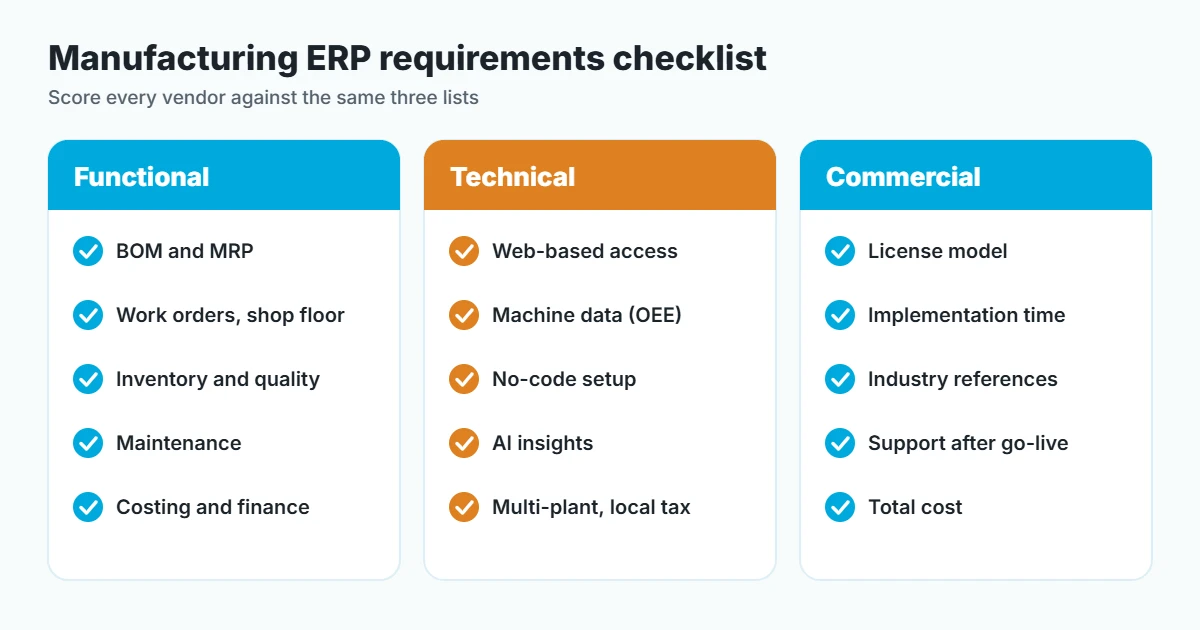
Bring all three areas together in one checklist, and then follow these steps:
- Map your processes: first, write down how orders flow from enquiry to dispatch.
- Mark must-haves: then split requirements into must-have and nice-to-have.
- Score each vendor: next, rate every system against the same list.
- See your own data: after that, ask for a demo with your products and BOMs, not sample data.
- Check references: finally, speak to manufacturers who already use the system.
For more help, read how to select the right ERP system for a manufacturing company. You can also request a free ERP assessment to map your requirements with an expert.
How eresource Xcel meets manufacturing ERP requirements
eresource Xcel has served discrete manufacturers since 2006, and it now runs in 400+ factories. Its modules cover BOM, MRP, work orders, shop floor, quality, maintenance, inventory and purchase. In addition, IoT integration brings real-time OEE, machine downtime and cycle times into the system. Meanwhile, AzaaleaGPT, its built-in AI, helps production managers spot issues early.
eresource also licenses its ERP per business, so one flat license covers unlimited users. Its no-code framework helps you go live up to 3X faster than with a traditional ERP. Also, it supports local compliance across India, the GCC and Africa, including GST and VAT. To see how it works on your products, book a free demo.
Frequently asked questions
What are manufacturing ERP requirements?
Manufacturing ERP requirements are the features and conditions a plant needs from an ERP system. They include functional needs such as BOM, MRP, shop floor and quality, plus technical and commercial needs such as access, licensing and support.
Which modules does a manufacturing ERP need?
Most plants need BOM, planning and MRP, work orders, shop floor, inventory, quality, purchase, maintenance, costing and finance. Process plants also need formulas, batch records and expiry control.
How do I write an ERP requirements list?
First, map how orders flow through your plant. Then list what each team needs, mark must-haves, and score every vendor against the same list.
Do small manufacturers need an ERP?
Yes, once spreadsheets start causing stock errors, late deliveries or unknown costs. Read why eresource is a big advantage for small companies.
Which eresource edition fits my plant?
eresource Xcel fits discrete manufacturers, such as auto parts, machinery and electronics makers. eresource BPro fits process manufacturers, such as chemical, food and pharma plants.
Also Read – 8 Key Benefits of ERP for the Manufacturing Industry



