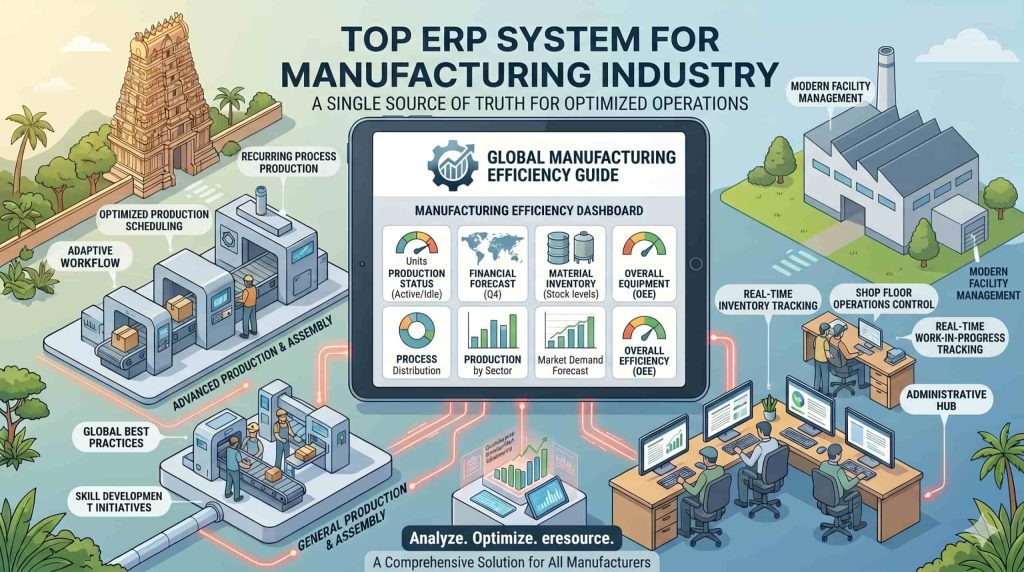
Top ERP System for Manufacturing Industry
Manufacturing companies manage production, materials, inventory, machines, employees, suppliers, customers, and finances every day.
As manufacturing operations grow, managing these processes through spreadsheets and disconnected applications becomes difficult. Production teams need accurate information to plan jobs. Purchase teams need visibility into material requirements. Stores need real-time inventory data. Management needs clear information about production costs and business performance.
A top ERP system for manufacturing industry connects these activities through one integrated platform.
Manufacturing ERP software can bring together production planning, material requirements, BOM management, inventory, procurement, shop-floor operations, quality control, costing, sales, finance, and reporting.
For manufacturers, the right ERP system should match the company’s production model, product complexity, inventory requirements, quality processes, and growth plans.
What Is a Manufacturing ERP System?
A manufacturing ERP system is enterprise software designed to manage manufacturing and business operations through an integrated platform.
It connects departments that normally work with different data and processes.
A manufacturing ERP system can manage:
Production planning
Production scheduling
Material Requirements Planning (MRP)
Bill of Materials (BOM)
Routing and operations
Work orders
Shop-floor control
Raw material inventory
Warehouse management
Purchase management
Sales and order management
Quality management
Machine maintenance
Job costing
Finance and accounting
Customer relationship management
Business reporting
This integration gives manufacturers better visibility from raw material procurement to finished-goods dispatch.
Why Manufacturing Companies Need ERP Software
Manufacturing involves many connected activities.
A typical manufacturing process can look like:
Customer Order → Production Planning → MRP → Procurement → Material Receipt → Production → Quality Inspection → Finished Goods → Dispatch → Invoicing
A delay in one activity can affect the next stage.
For example, a shortage of raw material can stop production. A change in BOM can affect purchasing. A production delay can affect customer delivery.
ERP software connects these processes and provides a centralized source of information.
Common Manufacturing Challenges
Manufacturers commonly face challenges such as:
Production delays
Material shortages
Excess inventory
Inaccurate stock information
Manual production reporting
BOM errors
Poor production scheduling
Machine downtime
Quality issues
High material wastage
Difficult job costing
Limited shop-floor visibility
Procurement delays
Delayed management reports
A manufacturing ERP system helps organize these processes and provides better operational control.
Key Features of a Top ERP System for Manufacturing Industry
1. Bill of Materials Management
The Bill of Materials defines the components required to manufacture a product.
A manufacturing ERP should support:
Single-level BOM
Multi-level BOM
BOM revisions
Alternate materials
Component quantities
Scrap and yield factors
BOM costing
Production linkage
Modern manufacturing ERP platforms can also connect BOM versions directly with production and costing.
2. Production Planning and Scheduling
Production planning helps manufacturers decide what to produce, when to produce it, and which resources are required.
ERP software can consider:
Customer orders
Forecast demand
Material availability
Machine capacity
Workforce availability
Production priorities
Delivery schedules
A connected planning system helps production teams coordinate jobs more effectively.
3. Material Requirements Planning
MRP helps determine the materials required for planned production.
The system can consider:
Existing inventory
Open purchase orders
Production requirements
BOM quantities
Lead times
Safety stock
Planned production
This helps companies plan procurement according to actual production requirements.
4. Inventory and Warehouse Management
Manufacturers need accurate inventory information to maintain continuous production.
ERP software can track:
Raw materials
Components
Work-in-progress
Finished goods
Consumables
Spare parts
Multiple warehouses
Multiple locations
It can also track stock receipts, issues, transfers, returns, and adjustments.
5. Work Order Management
Work orders define the production work that needs to be completed.
An ERP system can connect work orders with:
Product
BOM
Routing
Required materials
Work centres
Planned quantity
Production schedule
Quality requirements
This gives production teams a structured way to execute manufacturing jobs.
6. Shop-Floor Management
Shop-floor visibility is important for manufacturers.
ERP software can help supervisors track:
Current production jobs
Completed quantities
Pending quantities
Scrap
Rework
Machine status
Production delays
Work-centre utilization
Modern manufacturing ERP systems can also integrate shop-floor and machine data for real-time visibility.
7. Quality Management
Quality management should cover incoming materials, production processes, and finished goods.
ERP software can support:
Incoming inspection
In-process inspection
Final inspection
Quality parameters
Rejection management
Non-conformance
Corrective actions
Quality documentation
This helps manufacturers maintain consistent quality standards.
8. Production Costing
Manufacturers need to understand the actual cost of every product and production order.
ERP software can track:
Material cost
Labour cost
Machine cost
Subcontracting cost
Overhead cost
Production variances
It can compare standard costs with actual costs.
This gives management better visibility into manufacturing margins.
9. Purchase and Supplier Management
Production depends on timely procurement.
Manufacturing ERP software can manage:
Purchase requisitions
RFQs
Supplier quotations
Purchase orders
Material receipts
Supplier invoices
Supplier performance
Purchase requirements can also connect with MRP and inventory planning.
10. Sales and Order Management
Manufacturing ERP should connect sales orders with production and inventory.
The system can help manage:
Customer enquiries
Quotations
Sales orders
Delivery schedules
Product availability
Production requirements
Dispatch
Invoicing
This creates better coordination between sales and production teams.
11. Machine Maintenance
Machine downtime can affect production schedules and delivery commitments.
ERP software can support:
Preventive maintenance
Breakdown maintenance
Maintenance schedules
Service history
Spare parts
Machine downtime
Maintenance costs
Modern manufacturing ERP platforms can also connect maintenance with machine performance and shop-floor information.
12. Engineering Change Management
Manufactured products can change during their lifecycle.
Engineering teams may update:
BOMs
Drawings
Components
Specifications
Manufacturing processes
An ERP system with revision control helps production teams use the approved version.
This reduces errors caused by outdated manufacturing information.
Benefits of Using ERP Software for Manufacturing Industry
Better Production Planning
ERP provides a centralized view of orders, materials, capacity, and production schedules.
Improved Inventory Control
Manufacturers can track stock across warehouses and locations.
Reduced Material Waste
Better material planning and consumption tracking can help identify unnecessary usage and production losses.
Improved Production Visibility
Managers can monitor production status and identify delays.
Better Cost Control
ERP connects manufacturing costs with products and production orders.
Faster Reporting
Management can access operational and financial information through integrated reports and dashboards.
Better Department Coordination
ERP connects production, purchase, stores, quality, sales, and finance.
Improved Customer Delivery
Better production planning and inventory visibility can support more reliable delivery scheduling.
Types of Manufacturing Companies That Can Use ERP
Manufacturing ERP software can support different production environments.
Discrete Manufacturing
Discrete manufacturers produce individual products or components.
Examples include:
Automotive components
Engineering goods
Machinery
Electrical equipment
Electronics
Industrial products
Pumps
Valves
Metal fabrication
Make-to-Order Manufacturing
Make-to-order businesses manufacture products based on customer specifications.
ERP can connect customer orders with engineering, BOM, production, procurement, and costing.
Make-to-Stock Manufacturing
Make-to-stock manufacturers produce based on forecast or expected demand.
ERP can help connect sales forecasts with production planning and inventory requirements.
Engineer-to-Order Manufacturing
Engineer-to-order companies create products based on specific customer requirements.
ERP can connect engineering changes, BOMs, costing, procurement, and production.
Job Shop Manufacturing
Job shops handle multiple customized production orders.
ERP software can help manage job cards, work centres, routing, material requirements, and job-wise costing.
Manufacturing Industries That Can Use ERP
A manufacturing ERP system can support many industries, including:
Automotive components
Engineering goods
Machinery and equipment
Electronics
Electrical products
Metal fabrication
Valve manufacturing
Pumps
Rubber products
Plastics
Medical devices
Defence manufacturing
Aerospace
Textile manufacturing
Printing and packaging
Industrial products
eresource Xcel currently positions itself for more than 20 discrete manufacturing types, including automotive, engineering goods, machinery, electronics, metal fabrication, valves, rubber, plastics, textile, defence, and medical devices.
Important Modules in Manufacturing ERP
| ERP Module | Main Purpose |
|---|---|
| BOM Management | Manage product structures and components |
| Production Planning | Plan manufacturing activities |
| MRP | Calculate material requirements |
| Work Orders | Control production jobs |
| Shop Floor | Monitor production execution |
| Inventory | Manage raw materials and finished goods |
| Purchase | Manage procurement and suppliers |
| Quality | Control inspections and quality processes |
| Maintenance | Manage machines and maintenance activities |
| Costing | Track product and production costs |
| Sales | Manage customer orders and dispatch |
| Finance | Manage accounting and financial control |
| CRM | Manage customers and sales opportunities |
| Reporting | Monitor business performance |
What Makes a Top ERP System for Manufacturing?
The “top” ERP system is not defined by the number of modules alone.
Manufacturers should evaluate whether the system fits their actual production environment.
Important factors include:
Manufacturing Depth
The ERP should support real manufacturing processes rather than only basic inventory transactions.
BOM and MRP Capability
The system should handle product structures, revisions, material planning, and production requirements.
Shop-Floor Visibility
Production teams should be able to monitor work orders and manufacturing progress.
Quality Integration
Quality checks should connect with procurement, production, and finished-goods processes.
Costing
The system should provide visibility into standard and actual manufacturing costs.
Scalability
The ERP should support additional products, users, plants, warehouses, and production volumes as the company grows.
Integration
The ERP should connect production with sales, purchase, inventory, finance, quality, and maintenance.
Deployment Flexibility
Businesses may require cloud, on-premise, or hybrid deployment based on their IT environment.
Why Choose eresource Xcel for Manufacturing?
eresource Xcel is the manufacturing ERP platform from eresource ERP.
The current platform is positioned specifically for discrete manufacturers and covers production planning, BOM, MRP, work orders, shop-floor control, quality, maintenance, inventory, purchase, costing, and related manufacturing processes.
It also supports manufacturing environments such as engineering goods, automotive components, machinery, electronics, metal fabrication, valves, rubber products, plastics, textile, and other discrete manufacturing segments.
The platform provides capabilities for multi-level BOMs, production scheduling, material traceability, quality control, engineering changes, maintenance, and job costing.
For manufacturers looking for an integrated system, Xcel can connect planning, procurement, production, inventory, quality, sales, and financial processes through one ERP platform.
How to Select ERP Software for Manufacturing
Before selecting a manufacturing ERP system, companies should evaluate their current processes.
Step 1: Identify Manufacturing Requirements
Document your current production, inventory, procurement, quality, costing, and reporting processes.
Step 2: Define ERP Requirements
List the modules and workflows your business needs.
Step 3: Check Manufacturing Features
Evaluate BOM, MRP, production planning, shop-floor control, quality, costing, and maintenance capabilities.
Step 4: Review Integration
Check how production connects with inventory, procurement, sales, finance, and other departments.
Step 5: Evaluate Implementation
Review data migration, configuration, training, testing, support, and implementation timelines.
Step 6: Consider Future Growth
Select a system that can support additional products, plants, locations, users, and business processes.
Conclusion
Manufacturing companies need more than accounting and inventory software.
They need a system that connects planning, BOM, MRP, procurement, inventory, production, shop-floor operations, quality, costing, maintenance, sales, and finance.
A top ERP system for manufacturing industry should match the company’s production model and provide real-time visibility across the manufacturing lifecycle.
For discrete manufacturers, eresource Xcel provides an integrated manufacturing ERP platform with capabilities across production planning, BOM, MRP, shop-floor control, quality, inventory, costing, maintenance, procurement, and reporting.
Manufacturers can evaluate their current processes, identify operational gaps, and select an ERP system that supports both current requirements and future business growth.
Frequently Asked Questions About Manufacturing ERP
Common questions from manufacturing companies
What is the top ERP system for manufacturing industry?
The right ERP depends on the manufacturer's production model, industry, company size, processes, and business requirements. A suitable manufacturing ERP should support production planning, BOM, MRP, inventory, quality, costing, procurement, and shop-floor operations.
What is manufacturing ERP software?
Manufacturing ERP software is an integrated system that manages production and related business processes such as inventory, procurement, sales, quality, costing, maintenance, and finance.
Why do manufacturers need ERP software?
Manufacturers use ERP software to connect production with inventory, procurement, sales, finance, quality, and other business functions.
Can manufacturing ERP manage BOM?
Yes. Manufacturing ERP can manage single-level and multi-level BOMs, revisions, components, quantities, costing, and production requirements.
Can ERP manage MRP?
Yes. Manufacturing ERP can calculate material requirements based on production plans, BOMs, inventory, open orders, and other planning parameters.
Can ERP track shop-floor production?
Yes. Manufacturing ERP can track work orders, production quantities, operations, scrap, rework, work-centre activities, and production status.
Can ERP manage manufacturing costs?
Yes. ERP can track material, labour, machine, subcontracting, and overhead costs.
Is manufacturing ERP suitable for small companies?
Yes. Small and growing manufacturers can use ERP when the system matches their production requirements and provides suitable scalability.
Can ERP support multiple manufacturing plants?
Yes. A suitable ERP can manage multiple plants, warehouses, locations, products, and production operations from a centralized system.
Is cloud ERP suitable for manufacturers?
Cloud ERP can provide remote access, centralized data, easier scalability, and reduced infrastructure requirements. Businesses should evaluate security, integration, connectivity, backup, and support before selecting a deployment model.