


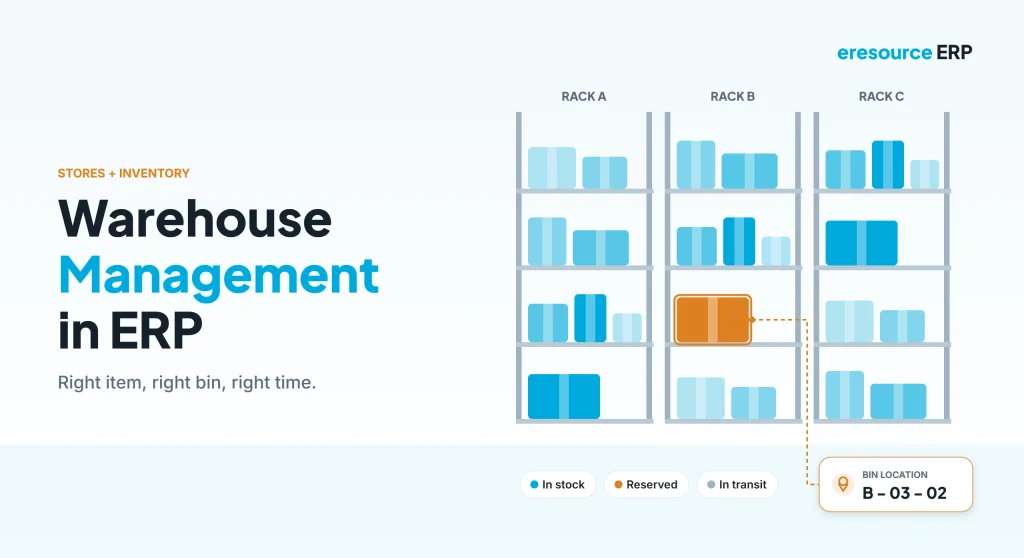
Warehouse management in ERP keeps every item in the right place, at the right quantity and value, so orders ship on time and stock counts match the books. A warehouse can look full and still miss orders. For example, the item may sit in the wrong bin, or the count may be wrong. As a result, teams waste time searching, customers wait and finance cannot trust the stock value. This guide explains how warehouse management in ERP works, the features that matter and how to set it up.
Key takeaways
- Know the exact location: track stock down to the bin, not just the warehouse.
- Guide every move: put-away and picking rules cut errors and walking time.
- Keep stock right-sized: reorder levels, ABC and XYZ analysis guide what to hold.
- Value stays correct: every receipt, issue and transfer updates quantity and cost.
What is warehouse management in ERP?
Warehouse management in ERP is the part of the system that controls how goods are received, stored, moved and shipped. Meanwhile, it works alongside inventory control, which decides how much stock to hold.
In eresource, you can define your warehouse structure down to the unit level: warehouse, rack, shelf and bin. So the system always knows where each item sits. In addition, because the module shares one database with purchase, production and sales, stock stays current and correctly valued.
Spreadsheets vs warehouse management in ERP
Overall, the table below shows how daily work changes once the warehouse runs on an ERP:
| Area | Spreadsheets and registers | Warehouse management in ERP |
|---|---|---|
| Location | Known only to the store keeper | Bin-level location for every item |
| Receipts | Written in a register | Goods receipt note linked to the PO |
| Picking | From memory | Pick lists with location and priority |
| Transfers | Notes and phone calls | Stock and bin transfers in the system |
| Stock counts | Once a year, with big gaps | Cycle counts and quick reconciliation |
| Valuation | Calculated at month end | Updated with every movement |
How goods move with warehouse management in ERP
In general, every item follows the same basic path. For example, here is how an ERP guides each step:
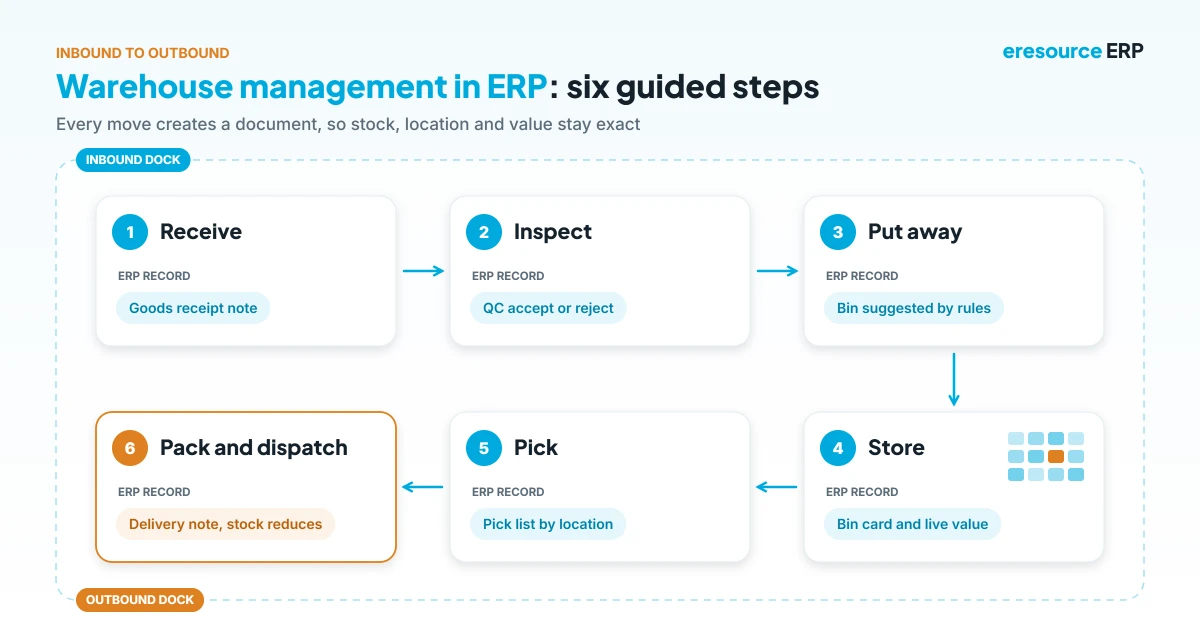
- Receive: first, the store records a goods receipt note against the purchase order.
- Inspect: next, quality control accepts or rejects the material.
- Put away: then the system suggests a bin based on item, space and rules.
- Store and track: meanwhile, stock, location and value update in real time.
- Pick: after that, pick lists follow your strategy, such as location priority.
- Pack and dispatch: finally, goods ship with a delivery note, and stock reduces at once.
Key features of warehouse management in ERP
In short, look for these eight features when you compare options for warehouse management in ERP.
1. Multiple warehouses and bin locations
First, set up as many warehouses as you need, each with its own racks and bins. As a result, every item has an exact address.
2. Item attributes
Next, record details such as colour, size, grade, pressure rating and quality. As a result, the team picks exactly the right variant.
3. Goods receipt and put-away
Also, receipts link to the purchase order. After that, the system guides staff to the right bin, so items do not go to the wrong place.
4. Picking strategies
In addition, picking can follow stock levels, location priority or other rules. Consequently, this cuts walking time and wrong picks.
5. Stock and bin transfers
Moreover, you can move goods between warehouses, branches or bins with full tracking. Therefore, nothing goes missing in transit.
6. Material requisitions and issues
Similarly, departments raise requisitions and indents, which go for approval before stores issue the material.
7. Purchase and sales returns
Likewise, returns come back into stock or quarantine with a clear record. Therefore, both stock and accounts stay correct.
8. Physical and cycle counts
Finally, count stock regularly instead of once a year. The system then highlights gaps and helps reconcile them quickly.
Inventory control: keep the right stock level
Good warehouse management in ERP also helps you decide what to keep. Specifically, inventory control covers setting targets, planning replenishment, monitoring usage and reconciling balances.
Above all, two simple tools help here. First, ABC analysis ranks items by value, so you watch high-value stock closely. Second, XYZ analysis ranks items by how steady their demand is. Together, they show which items need tight control and which can follow simple reorder rules.
In addition, ageing analysis flags slow and old stock before it becomes dead stock.
Reports every warehouse manager needs
Similarly, good reports turn warehouse data into daily decisions:
- Bin card: every movement of an item in one bin.
- Stock movement: receipts, issues and transfers by date or location.
- Arrivals and departures: what came in and went out today.
- Ageing analysis: stock by age, to spot slow movers.
- Inventory valuation: the value of stock by item, group or warehouse.
- Personalised reports: build your own views without a developer.
Benefits of warehouse management in ERP
- Fewer picking errors: right item, right quantity, right bin.
- Faster dispatch: shorter search and walking time.
- Better use of space: the system suggests moves to free up room.
- Accurate stock value: finance trusts the numbers every day.
- Fewer stock-outs: reorder levels trigger purchase in time.
How to set up warehouse management in ERP
- Map your layout: first, list warehouses, racks, shelves and bins with simple codes.
- Clean item data: next, fix units, attributes and groups in the item master.
- Set rules: then define put-away, picking and reorder rules for key items.
- Count opening stock: after that, load a fresh physical count by bin.
- Train and review: finally, train store staff and review ageing and gaps every month.
Also, stock arrives through purchase, so read how the procurement process in ERP feeds the warehouse.
Why eresource for warehouse and inventory
eresource is a web-based, AI-powered and no-code ERP with 37 integrated modules on one platform. It has also served businesses for 20 years, with 3,000+ go-lives.
- Bin-level control: define warehouses down to individual bins.
- Multi-warehouse: track stock, transfers and value across all sites.
- Full store workflow: GRN, requisition, approval, issue, returns and indents.
- Analysis built in: ABC, XYZ, ageing and valuation reports.
- Integrated: purchase, production, sales and accounts update together.
- Unlimited users: give every store keeper access without extra license fees.
To learn more, read about real-time inventory in eresource, the ERP sales module and how to select the right ERP. You can also see ERP for trading and distribution and ERP for the automobile industry.
Frequently asked questions
What is warehouse management in ERP?
It is the ERP function that controls receiving, storing, moving and shipping goods, with stock tracked down to the bin.
What is the difference between inventory management and warehouse management?
Inventory management decides how much stock to hold. In contrast, warehouse management controls where it is stored and how it moves.
Can warehouse management in ERP track stock at bin level?
Yes. For example, eresource lets you define warehouses, racks, shelves and bins, so every item has an exact location.
What are ABC and XYZ analysis?
ABC analysis ranks items by value. Meanwhile, XYZ analysis ranks them by how steady demand is. Together, they guide stock control.
How often should we count stock?
Ideally, count high-value items often through cycle counts, and do a full physical count at least once a year.
Does eresource support multiple warehouses?
Yes. In fact, eresource handles many warehouses and branches, with stock transfers and valuation across all of them.
Want to see warehouse management in ERP on your own stores? Book a free demo, or start with a free ERP assessment.
Also Read – Construction ERP Software in UAE



