


Personalized ERP: Give Every User the Right Information at the Right Time
Your business collects more data every day. Yet the people who need that data often cannot find it fast. A personalized ERP solves this problem. It shows each person the facts that fit their role. So nobody has to dig through screens full of numbers they do not need.
In this post, we explain why each user needs a different view of the business. We also show how eresource tailors the system for customers, suppliers and staff.
About eresource ERP
eresource runs fully on the web and uses a flexible, service-based design. It also offers industry-specific ERP editions for many sectors. These include manufacturing, pharma, fleet management, construction, infrastructure and trading.
The system helps firms work more efficiently from day one and build an edge over rivals. It also grows with your business. In addition, our team supports you from start to finish, so you have one point of contact. As a result, you get a fast return on investment and a low total cost of ownership.
More Data, But Less Access
Most firms now have more data than ever before. However, more data does not always mean better decisions. If people cannot reach the right facts quickly, the data has little value.
Moreover, each part of your business needs its own set of facts. A sales rep, a buyer and a customer all ask different questions. So one screen for everyone simply does not work.
What Each User Needs
Here is what different users usually look for:
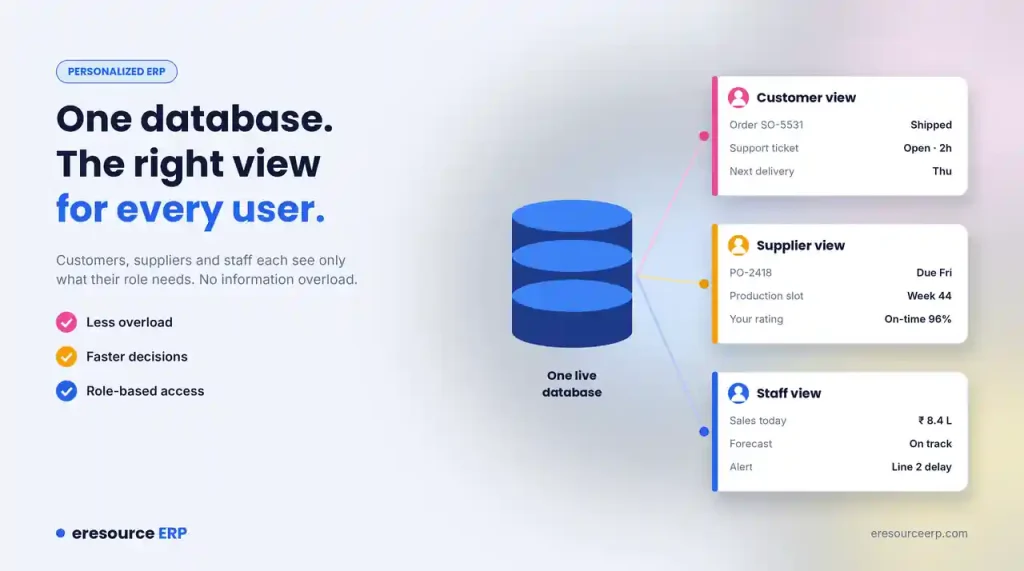
- Customers: Up-to-date order status and quick support.
- Suppliers: Purchase orders, production schedules and feedback on their performance.
- Staff: The latest sales figures and forecasts, alerts about hold-ups in production and their own HR details.
How Personalized ERP Works
eresource delivers key information tailored to each user. It gives customers, suppliers and staff access to the records that match their role. The data can come from inside eresource or from other systems you connect.
Each user’s screen then shows only what matters to them. This filters out information overload, so people can focus on their work. Because the interface is simple, users also learn it quickly. Read more about what makes an easy-to-use ERP.
Real-Time Access Through the Web
Because eresource runs on the web, you can share your business data beyond the office. Remote staff and partners in your supply chain get live information whenever they need it.
For example, a sales rep on the road can check stock before quoting a delivery date. Similarly, managers can approve requests through the mobile ERP app. In short, everyone makes better decisions with up-to-date facts.
Benefits of a Personalized ERP
When each user sees the right information, the whole business moves faster:
- Less overload: People see only the data they need.
- Faster decisions: Key facts appear on the first screen.
- Smoother transactions: Orders and approvals move without delays.
- Quicker turnarounds: Teams respond to customers and suppliers sooner.
- Better teamwork: Everyone works from the same live data. Learn more about collaboration with suppliers and customers.
- Safer data: Role-based access keeps private records safe. See our post on ERP security.
How to Set Up Personalized ERP Views
Follow these steps to give every user the right view:
- List your roles: Write down each type of user, inside and outside the company.
- Pick the key facts: Decide what each role needs to see every day.
- Build role screens: Use no-code tools to set up dashboards for each role.
- Set access rights: Choose who can view, edit or approve each record.
- Ask for feedback: Check with users after a month and refine their screens.
See Personalized ERP in Action
eresource has helped businesses put the right data in the right hands since 2006. To see role-based screens on your own processes, book a free ERP demo. You can also read why many firms rank eresource among the best ERP software in India.
Also Read – Construction ERP Software
FAQs About Personalized ERP
What does a personalized ERP do?
It shows each user the facts that fit their role. So a sales rep, a buyer and a manager each see a different, focused screen.
Why does each user need a different view?
Each role asks different questions. Customers want order status, suppliers want purchase orders and schedules, and staff want sales figures and alerts.
How does personalization reduce information overload?
It filters out data a user does not need. As a result, people find key facts faster and make better decisions.
Can remote users access eresource?
Yes. eresource runs on the web, and the mobile app lets managers approve requests on the go.
Does role-based access keep data safe?
Yes. You decide who can view, edit or approve each record, so private data stays safe.



