Table of Contents
Introduction
UAE e-invoicing is no longer just an upcoming regulation. It is an implementation challenge that businesses must start preparing for today.
Most companies understand the concept.
Very few know how to actually implement it step by step.
That’s where this guide helps.
This is not a theory.
This is a practical checklist you can follow to make your business fully ready for UAE e-invoicing.
Why You Need a Checklist (Not Just Awareness)
Many businesses fail because they:
- Start too late
- Miss critical steps
- Choose the wrong systems
- Underestimate integration complexity
A checklist ensures:
- No missed steps
- Better planning
- Faster implementation
- Reduced compliance risk
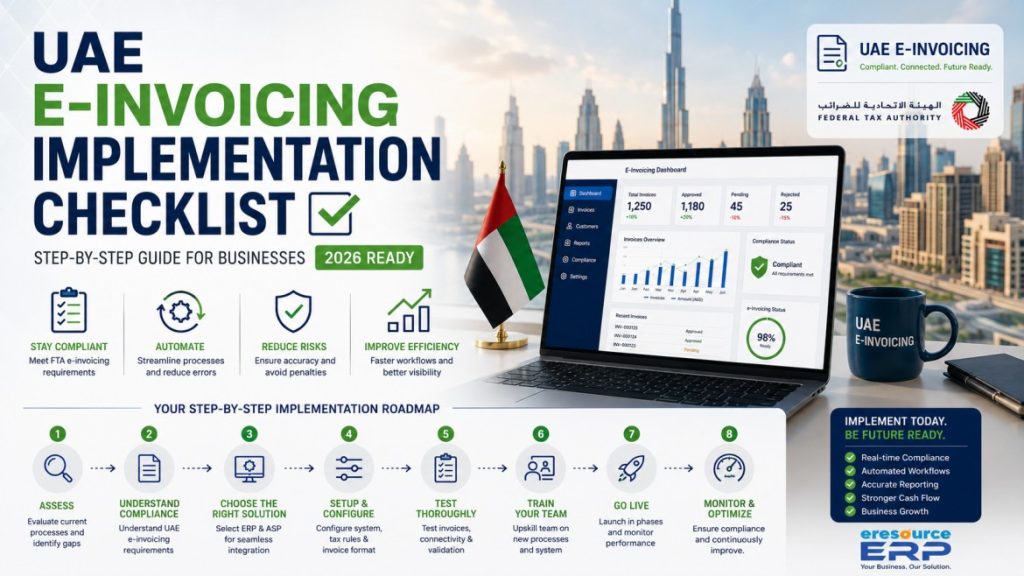
Complete UAE E-Invoicing Implementation Checklist
Phase 1. Business Readiness Assessment
Before jumping into tools, understand where you stand.
Evaluate Current Invoicing Process
Ask:
- Are invoices generated manually?
- Do you use Excel or PDFs?
- Is your system automated?
👉 If your process is manual, you are not ready.
Check System Capabilities
Your system must support:
- Structured invoice format (XML)
- API integration
- VAT compliance
- Real-time validation
👉 If not, an upgrade is required.
Identify Gaps
Common gaps include:
- No automation
- No integration capability
- Data inconsistencies
Document everything clearly.
Phase 2. Compliance Understanding
Many businesses skip this and face problems later.
Understand UAE Requirements
E-invoicing in the UAE requires:
- Structured invoices (PINT-AE format)
- Real-time validation
- Transmission via Accredited Service Providers
Regulated by the Federal Tax Authority.
Identify Required Data Fields
Ensure your invoices include:
- Supplier details
- Buyer details
- VAT numbers
- Line items
- Tax breakdown
Missing data = rejected invoices.
Phase 3. Technology Selection
This is the most critical decision.
Choose the Right System
You have 3 options:
- Standalone tools
- Accounting add-ons
- ERP systems (recommended)
👉 ERP is the most scalable and reliable.
Select an Integrated Solution
Instead of managing multiple tools, businesses are choosing integrated systems like eresource ERP.
This helps:
- Reduce complexity
- Ensure compliance
- Automate workflows
Choose an ASP (Accredited Service Provider)
ASP will:
- Validate invoices
- Transmit invoices
- Ensure compliance
Your system must connect with ASP seamlessly.
Phase 4. System Setup & Configuration
Now comes execution.
Configure Invoice Format
- Align with PINT-AE requirements
- Include all mandatory fields
- Ensure correct tax calculations
Setup API Integration
- Connect ERP with ASP
- Test data transmission
- Ensure error handling
Configure Tax Rules
- VAT calculation
- Tax reporting
- Compliance checks
Phase 5. Testing Phase (Most Ignored but Critical)
Skipping testing is a major mistake.
Test Invoice Generation
- Correct format
- Accurate data
Test API Connectivity
- Successful transmission
- Error scenarios
Test Compliance Validation
- Ensure invoices pass validation
- Fix errors before go-live
Phase 6. Team Training
Technology alone is not enough.
Train Finance Team
- New invoicing process
- Error handling
- Compliance workflow
Train Operations Team
- System usage
- Data entry accuracy
Phase 7. Go-Live Strategy
Start with Pilot Run
- Test with limited transactions
- Monitor results
Monitor Performance
Track:
- Invoice success rate
- Errors
- Processing time
Fix Issues Quickly
- Resolve errors
- Optimize workflows
Phase 8. Continuous Monitoring & Optimization
Implementation is not the end.
Monitor Compliance
- Ensure all invoices are accepted
- Stay updated with regulations
Improve Processes
- Reduce errors
- Increase automation
Scale System
- Handle higher transaction volume
- Expand operations
Common Mistakes to Avoid
Starting Too Late
Leads to rushed implementation.
Choosing Cheap Tools
Results in long-term problems.
Ignoring Integration
Creates operational chaos.
Skipping Testing
Causes failures during live operations.
Case Study. Checklist vs No Checklist
Company A (No Checklist)
- Started late
- No proper planning
- Faced integration issues
Result:
- Delays
- Increased cost
- Compliance risk
Company B (Checklist Approach)
- Planned early
- Followed a structured process
- Used ERP system
Result:
- Smooth implementation
- Zero compliance issues
- Faster operations
Why Businesses Are Choosing ERP for Implementation
Because it simplifies everything.
Instead of managing:
- Multiple tools
- Complex integrations
- Manual processes
ERP systems handle everything in one place.
How eresource ERP Simplifies Implementation
eresource ERP helps businesses:
- Automate invoicing
- Ensure UAE compliance
- Integrate with ASP
- Reduce manual workload
- Implement faster
This turns a complex process into a manageable one.
Final Thoughts
UAE e-invoicing is not just about compliance.
It is about execution, planning, and system readiness.
Businesses that follow a structured approach will:
- Avoid costly mistakes
- Reduce risk
- Improve efficiency
Those who don’t will struggle.
Frequently Asked Questions(FAQs)
Businesses should assess their systems, choose ERP solutions, integrate with ASP, configure invoices, test processes, and train teams before going live.
Businesses need structured invoices (PINT-AE), ERP integration, ASP connectivity, and real-time validation systems.
A checklist ensures businesses do not miss critical steps, reduces errors, and helps in smooth implementation.
Businesses should start as early as possible to avoid last-minute challenges and ensure smooth compliance.
ERP is not mandatory but highly recommended for automation, integration, and compliance efficiency.